
80年代風AI写真の作り方|レトロな雰囲気を簡単に再現
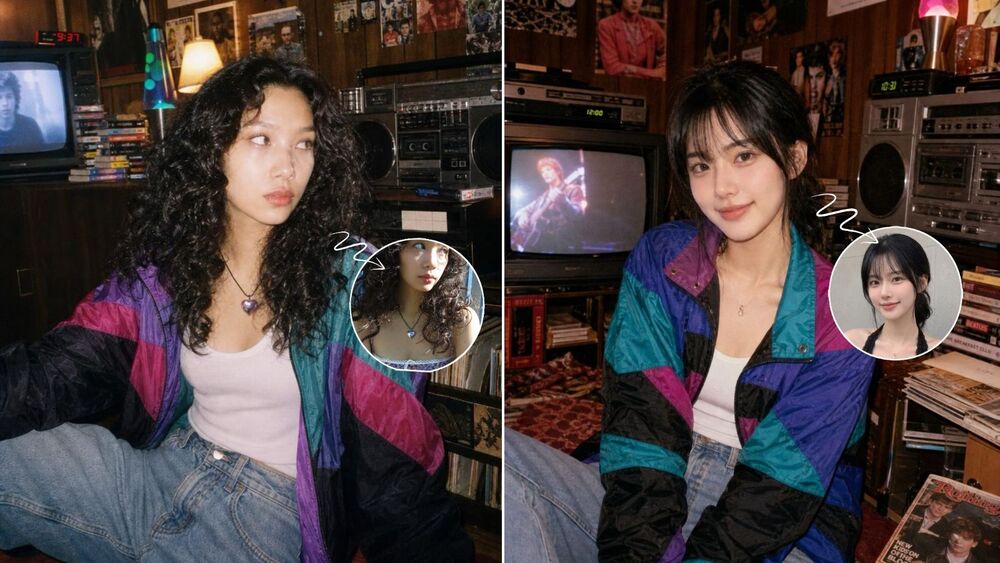
今SNSで注目されているのが、今の自分の写真をまるで80年代に撮ったような1枚に変身させる80年代風AI写真。
色味をレトロにするだけではなく、髪型やファッション、背景、光の雰囲気までガラッと変わるのがポイントです。
今回はBeautyPlusで手軽に作る方法と、ChatGPTの指示文を使って自分好みにアレンジする方法を紹介します♡
 App Store でダウンロード
 Google Play でダウンロード
80年代風AI写真とは?
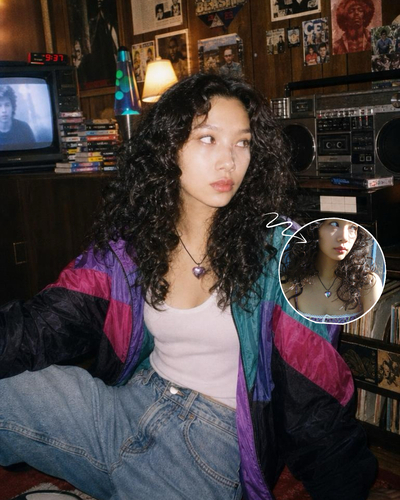
80年代風AI写真は、今の写真をベースにしながら、髪型や服装、背景などを80年代らしい雰囲気に変えるAI加工です。
ふんわり色あせた色味やフラッシュ感、フィルムの粒子を加えると、昔のアルバムから出てきたような仕上がりに。
顔の特徴は残っているのに、時代だけが変わったように見えるのがこのトレンドの面白さです。
BeautyPlusで80年代風AI写真を作る方法
長い指示文を考えずに楽しみたいなら、BeautyPlusを使うのが簡単です。
Step 1 写真生成機能を開く
BeautyPlusを開き、ホーム画面から写真生成機能に進みます。
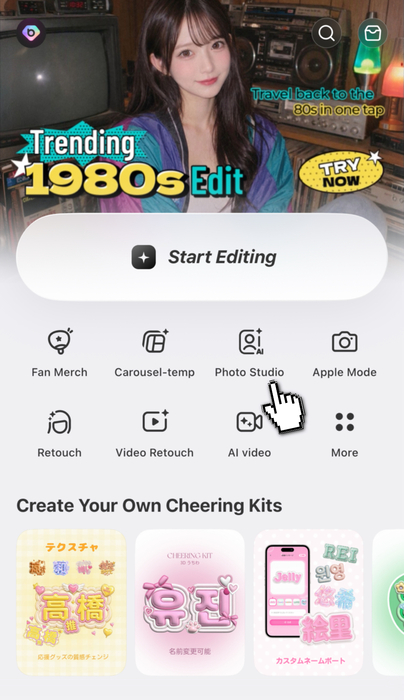
Step 2 人気のエフェクトが並ぶカテゴリから80年代風のエフェクトを選ぶ
人気のエフェクトが並ぶカテゴリを開き、表示されている80年代風のエフェクトを選びます。
髪型や服装、背景を細かく文章で指定しなくても、完成イメージを見ながら選べるのが便利です。
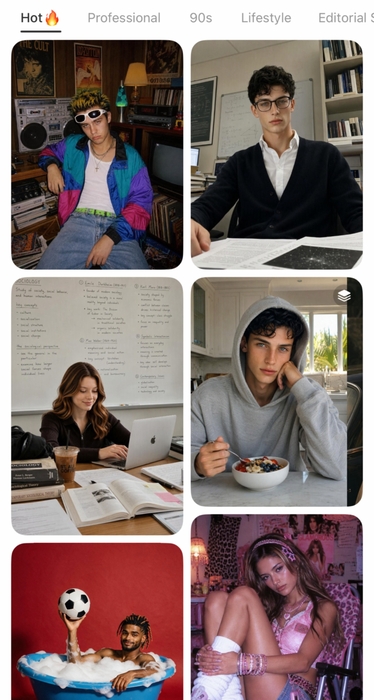
Step 3 写真をアップして生成
顔がはっきり写っている写真を選んで生成すれば完成です。
明るく、顔が大きく隠れていない写真を使うと自然な仕上がりになりやすいですよ。
もう少し甘めなら90年代風もおすすめ
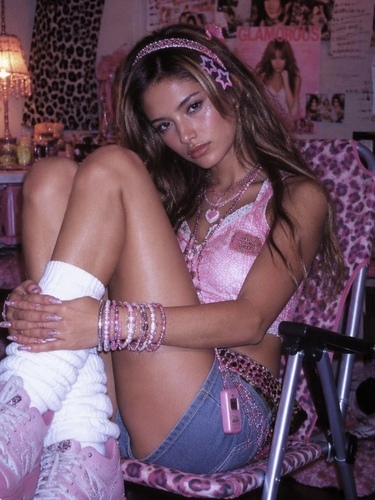
写真生成機能には、90年代をイメージしたレトロなエフェクトもあります。
ピンクのヒョウ柄やミニスカート、ルーズソックス、ローファーなどを取り入れたスタイルで、80年代よりも甘くて遊び心のある雰囲気。
懐かしくラフな80年代風と、ガーリーでファッション感の強い90年代風。どちらが自分に似合うか試してみるのも楽しいです♡
ChatGPTで80年代風AI写真を作る方法
背景や服装まで自分好みにしたいなら、ChatGPTの画像生成を使う方法もあります。
自分の写真をアップしたあと、作りたい雰囲気を具体的に指示文で伝えてみましょう。
おすすめの80年代風AI写真の指示文
まずは、以下の指示文をコピーして試してみましょう。仕上がりを変えたい場合は、髪型や服装、背景など気になる部分だけ追加で調整してみてください。
- Using my uploaded photo, preserve my recognizable facial features, identity, skin tone, and proportions. Reimagine me as an authentic late-1980s candid portrait, sitting casually on the floor in a cozy retro room with wood-paneled walls, a vintage CRT television, stereo equipment, a lava lamp, scattered magazines or records, and nostalgic 1980s posters in the background. Give me a soft shaggy 1980s hairstyle, natural makeup, and an effortlessly cool expression. Dress me in a colorful retro windbreaker jacket over a simple white top, with high-waisted light-wash jeans and white socks. Use warm indoor lighting with subtle direct flash, slightly faded film colors, gentle 35mm grain, and a believable analog snapshot feel. Make the image look like a genuine photo taken in the late 1980s, not a modern photo with a vintage filter. Remove modern objects, smartphones, logos, and contemporary styling.
髪型だけではなく、服装や部屋、光、フィルム感まで指定しているので、「80年代風にして」とだけ入力するよりもイメージを伝えやすくなります。
指示文は何度か調整してもOK
同じ指示文でも、元の写真によって仕上がりは少しずつ変わります。
「髪型をもう少し自然にしたい」「フィルム感を強くしたい」など、気になる部分だけ追加で調整してみるのがおすすめです。
指示文を考えたり細かく調整したりする手間を省きたいなら、BeautyPlusの写真生成機能を使うとさらに手軽です。
試してみたい80年代風AI写真アイデア3選
1 レトロなフォトブース写真
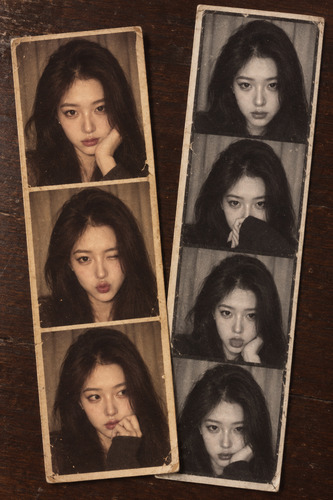
遊び心のある写真を作りたいなら、昔のフォトブースで撮ったようなフォトストリップがおすすめ。
黄みのある写真と、ざらっとしたモノクロ写真を組み合わせると、昔プリントした写真のような懐かしい雰囲気になります。
この雰囲気を再現するなら、以下の指示文をコピーして使ってみましょう。
- Using my uploaded photo, preserve my recognizable facial features, identity, skin tone, and proportions. Create a nostalgic retro photo booth composition placed on a dark wooden tabletop. Show two vertical photo strips slightly overlapping in a casual stacked arrangement. One strip should contain 3 frames with a warm yellowed vintage tint, and the other strip should contain 4 frames in a low-saturation grainy black-and-white style. In each frame, keep me as the subject with playful, natural photo booth expressions and small pose changes. Make the strips look like real printed photo booth snapshots with soft analog texture, subtle blur, visible film grain, and slightly faded tones. Keep the overall mood authentic, candid, and nostalgic. Do not use modern graphic poster frames or branded photo booth borders. Remove modern logos, smartphones, and contemporary styling.
2 80年代らしいレトロなスタジオ写真
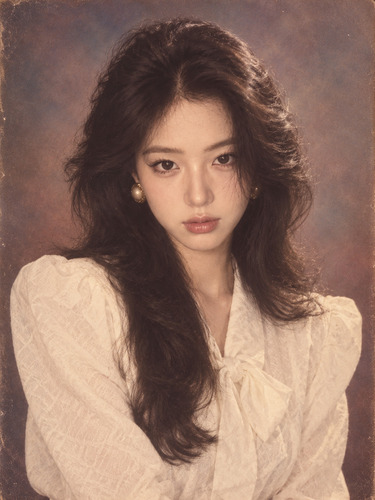
ボリュームのある髪型やレトロな服装、やわらかなフラッシュの光を取り入れた王道スタイル。
昔の写真館やショッピングモールで撮ったポートレートのような雰囲気が好きな人におすすめです。
スタジオ写真風に仕上げるためのおすすめの指示文はこちらです。
- Using my uploaded photo, preserve my recognizable facial features, identity, skin tone, and proportions. Reimagine me as an authentic 1980s portrait with voluminous era-appropriate hair, retro clothing, soft direct flash, warm faded film colors, subtle 35mm grain, and a nostalgic studio background. Make the image look like a genuine photo taken in the 1980s rather than a modern photo with a vintage filter. Remove modern objects, logos, smartphones, and contemporary styling.
3 80年代風の卒業アルバム写真
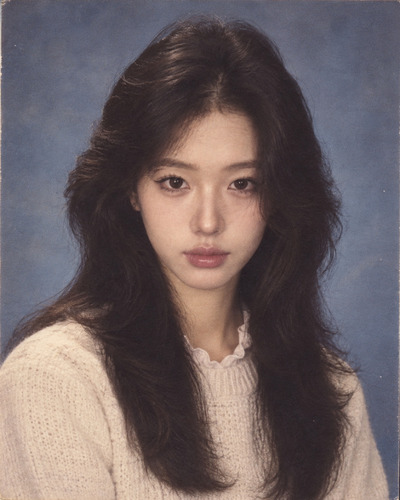
もう少しシンプルに楽しみたいなら、昔の卒業アルバム風もかわいい♡
背景やポーズをすっきりさせて、ふんわりした髪型や色あせたプリント感を加えると、本当に昔の学生写真のような仕上がりになります。
卒業アルバム風に仕上げたいなら、こちらの指示文を試してみましょう。
- Using my uploaded photo, preserve my recognizable facial features, identity, skin tone, and proportions. Reimagine me as an authentic mid-1980s yearbook portrait with softly feathered hair, natural makeup, simple era-appropriate clothing, a plain blue-gray studio backdrop, soft frontal flash, slightly faded print colors, and subtle film grain. Keep the pose neat and understated. Make it look like a genuine 1980s school portrait rather than a modern image with a retro filter. Remove modern accessories, logos, and contemporary styling.
よくある質問
今の写真をベースに、髪型や服装、背景、写真の質感などを80年代風に変えるAI加工です。
はい。BeautyPlusの写真生成機能から人気のエフェクトが並ぶカテゴリを開き、80年代風のエフェクトを選べば簡単に作れます。
顔がはっきり見えていて、明るく撮れている写真がおすすめです。顔が大きく隠れていない写真のほうが自然に仕上がりやすくなります。
髪型や服装だけでなく、フラッシュ感、色あせた色味、フィルムの粒子、昔らしい背景まで指定すると、より本格的な雰囲気になります。
80年代風は懐かしくラフなフィルム写真のような印象。90年代風はよりガーリーで遊び心があり、ファッションを楽しみたい人におすすめです。