app download btn
beautyplus logo

HomeAll Tools
Batch Photo Editor

Batch Photo Editor: Edit Multiple Photos at Once

Batch Photo Editor helps you enhance, compress, crop, resize, and change backgrounds instantly. Edit multiple photos at once to speed up your workflow.

Bulk edit up to 50 imagesDrag and drop images here
100% FreeNo Watermark
Scan to Download

Unlock More Free Features
& Get 7-day Free Trial in the App

batch.photo.editor.img.alt.1

Free Group Photo Editing Online

Save time and effort by batch editing multiple images. BeautyPlus lets you apply edits to entire batches with a single tap or click. There are no limits, fees, ads, or watermarks. Download your edited images when you’re done for personal or commercial use.
batch.photo.editor.img.alt.1

Bulk Edit Up to 50 Images

Traditional photo editing takes time, editing one image at a time. With BeautyPlus Batch Photo Editor, you can process up to 50 photos in just a few steps, helping you speed up and streamline your workflows.
batch.photo.editor.img.alt.1

Mass Photo Editing in Seconds

BeautyPlus Batch Photo Editor quickly applies edits to multiple photos with consistent, smooth, and reliable results. Processing images in bulk takes only seconds, helping you move forward faster with your projects.

What You Can Do with BeautyPlus Batch Photo Editor?

Compress
Resize
Crop
Enhance
Background

Compress Images for Smaller Sizes

Save space on your hard drive or in your cloud storage by batch compressing your images. Use the slider to manually adjust the compression level, choosing your ideal target size. Smaller images load faster on websites, making this batch compression tool handy for online stores and blogs.
batch photo editor

Resize Multiple Photos in One Go

Increase or decrease the size of a whole batch of images. Specify the dimensions you need, and the tool takes care of the rest. If you choose a size that exceeds the original image dimensions, the extra area can be filled with transparency or a custom color rather than distorting the image by making it too large.
batch photo editor

Batch Crop Photos for Clean Layouts

Cropping images is fast and easy with BeautyPlus Batch Photo Editor. It offers 7 convenient preset sizes you can select that are ideal for a wide range of applications. If you prefer, you can enter a custom size for batch cropping. You can also flip or rotate your images in bulk.
batch photo editor

Bulk Enhance Image Quality to HD

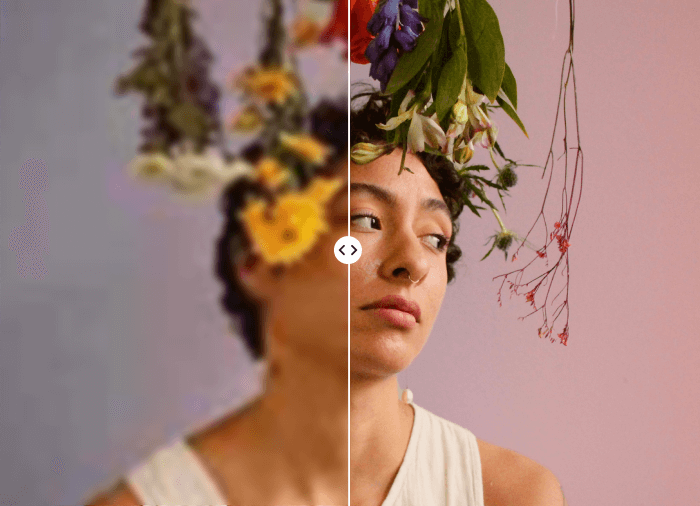
Enhance your photos in bulk with options like Ultra HD and AI Ultra HD, increasing sharpness and bringing out detail. You can also choose enhancement options based on photo type with options for pet, portrait, object and landscape photos. There is even an option to restore old photos.
batch photo editor

Edit or Remove Background in Group

Automatically detect and remove the backgrounds from a whole batch of images at the same time. If you prefer, you can batch edit the background color, or upload a custom background to add to all of your images at once.
batch photo editor

How to Edit Multiple Photos at Once?

Upload your batch

Drag and drop your photos to the Batch Photo Editor.

Select a batch editor feature

Select the feature you want to use for batch editing and apply it.

Download

The processed images will be packed into a zip file, which you can download and unzip.

how to

User Reviews

Maggie A.
I’m a writer, and one of the things I have to do is upload photos to WordPress for my articles. They all have to meet specific size requirements. The Batch Photo Editor lets me resize them all to the same width in seconds. It’s a huge time-saver.
Andrew R.
I use Batch Photo Editor to quickly compress all my photos before uploading them to my Shopify online store. It saves me a lot of time by handling lots of images at once. The crop feature is super handy for making sure my product photos look just right.
Vickie W.
I batch edit photos for my social media using Batch Photo Editor. I love how easy it makes it to crop and remove the background. I remember the old days when I had to do all that manually in other software. It’s nearly instant with this tool.

FAQs

How many images can I process at a time?

You can process up to 50 images at a time in the batch editor. You can upload them all at once, process them all simultaneously with one tap or click, and download them as a batch when you are finished.

Are there limits on file size or resolution?

There are no limits for file size or resolution for the Batch Photo Editor in general. But for the Image Enhancer and Background Removal tools specifically, there is an upper limit of 10MB and 4K resolution.

What happens if I resize to dimensions that exceed those of the original image?

Can I use more than one tool to batch edit my photos?

Is the BeautyPlus Batch Photo Editor free?

More

Related Posts

Instantly Mass Edit Your Photos

Try BeautyPlus Batch Photo Editor to edit multiple photos at once. Save time and get massive high quality images ready in seconds.