

Is Remove BG Shutting Down? Here’s What’s Happening
For over eight years, Remove BG has removed backgrounds from millions of images across the globe. But now, there’s talk about Remove BG shutting down. Well, to put it clearly, yes, Remove BG is shutting down on December 1, 2026.
If you’re someone who frequently uses the Remove BG website or has it saved among your bookmarks, you may need to start looking for an alternative. However, if you’ve grown used to its services and find it difficult to switch to another tool, there’s some good news for you. Remove BG will continue to exist, but only within Canva’s ecosystem.

Remove BG is a famous online tool that removes backgrounds from images within a matter of seconds. What launched as an Austrian start-up was quickly acquired by Canva following its viral breakthrough as one of the first truly 100% automatic, deep-learning-powered web tools to strip image backgrounds in seconds.
It was one of the easiest tools to use at the time of its launch, with an efficiency that surpassed many other tools, and thus became one of the most valuable background removers in the history of the internet.
On 1 December 2026 at 9:00 AM CET, Remove BG will no longer be available as a standalone website. Instead, it is moving to Canva, with API access through Leonardo.AI.
This means users can no longer use Remove BG directly from its website but will instead have to go to Canva and access its background remover to get the same quality results they were getting from Remove BG.
So why is this transition happening in the first place?
Well, ever since Canva acquired Remove BG’s parent company Kaleido AI, back in 2021, they have since revised their strategic vision.
By integrating Remove BG into Canva’s ecosystem, Canva benefits in three major ways:
1. Canva users can directly remove backgrounds efficiently, without having to switch platforms.
2. It reduces cost of supporting separate servers, branding, and support for three different platforms (Canva, Leonard.AI, and remove.bg)
3. Canva now gets a much stronger native background remover.
This comparison between Remove BG and Canva shows how the user experience will change once Remove BG fully transitions to Canva’s background remover.
| Features | Remove BG | Canva |
|---|---|---|
| Free to use | Free low-resolution downloads | Free plan; background removal requires paid access |
| Platform Type | Standalone background removal tool | Complete design and editing platform |
| Sign up or account | No account needed for basic use | Canva account required |
| Product efficiency | Automatic background removal in seconds | Same background removal technology |
| Batch processing | Available through bulk editing tools | Available through bulk background removal |
| Ease of use | Upload and remove background | Upload, remove background, and edit |
| Platform type | Standalone background remover | Design and editing platform |
| API support | Self-service API ends Dec 1 | Separate migration to Leonardo.ai |
Note: This comparison reflects the services before Remove BG’s scheduled shutdown on December 1, 2026. After that date, its standalone website, self-service API, and plugins will be discontinued, while existing enterprise API contracts will continue.
People were quick to express their disappointment with this move, and it’s not just because Canva already has a background remover. For many users, Remove BG was a simple tool where they could upload an image, remove its background, and download it within seconds without even creating an account.
Now, users are concerned about having to sign up for Canva and pay for a subscription just to use a feature they previously had access to for free. Artists and designers who relied on Remove BG’s Photoshop plugin, desktop app, and bulk editing tools are also unhappy about having to change their usual workflows.
On Reddit, some users have even questioned why Canva is shutting down a perfectly functional standalone website when it already offers the same background removal technology. Others are simply disappointed to see another useful tool become part of a larger paid platform.
If you’re someone who’s used to turning to Remove BG for quick background removals and aren’t sure where to go from here, Remove BG itself is encouraging users to switch to Canva, where the same technology is being used. But since many users preferred Remove BG for its standalone functionality, here are a few things to consider before December 1, 2026.
- Use your remaining credits: Any unused pay-as-you-go credits will expire on December 1. Unused annual subscription time will receive a pro-rata refund, while monthly renewals starting November 1 will be free.
- Look for alternatives: If you prefer a standalone tool, you can turn to options such as Adobe Background Remover, Photoroom Background Remover, BeautyPlus Background Remover, or Cutout.pro Background Remover.
- Move your API access: Developers using the self-service API will need to switch to Leonardo.ai before December 1. Existing enterprise API contracts will continue.
- Save your records: Download any invoices or usage reports you might need before the website shuts down.
The news of Remove BG shutting down has several users looking for a competitive remove bg alternative free of cost. One of the most intuitive, functional, easy-to-use, and versatile tools is BeautyPlus Background Remover. It offers a similar drag-and-drop upload feature to Remove BG, while also allowing users to replace backgrounds using either built-in options or using the images of their own.
To give you a better idea of just how convenient BeautyPlus Background Remover is to use, here’s what the entire process looks like.
1. Open your browser and head over to the BeautyPlus Background Remover page.
2. In the pink box on the right, you can either drag and drop your image or click “Upload Image” to select the image you want to remove the background from.
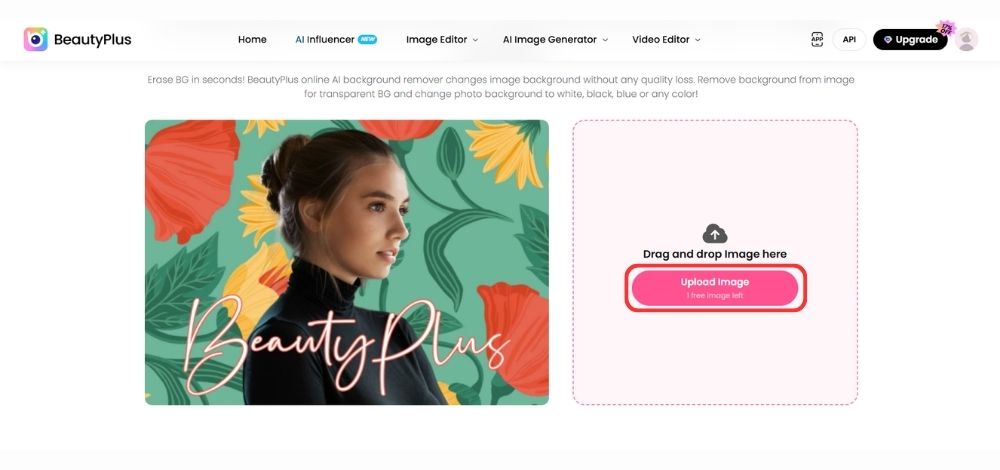
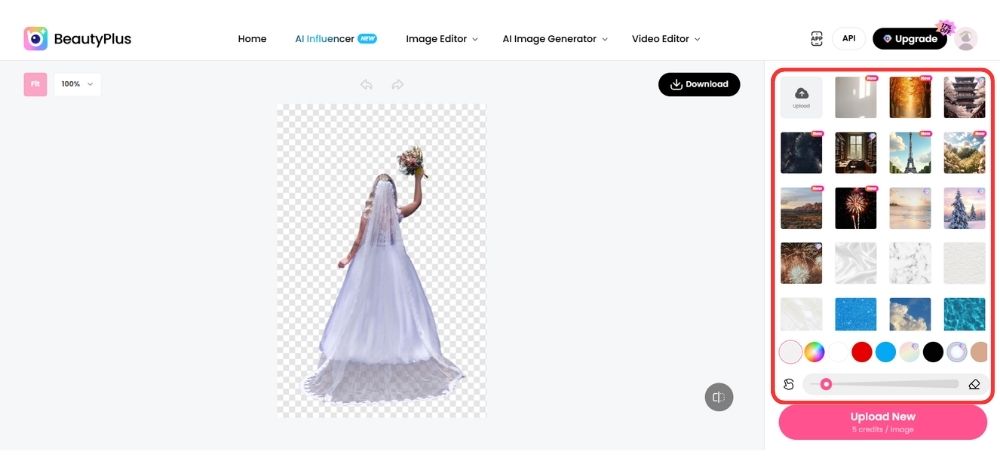
3. BeautyPlus will automatically detect the main subject and remove the background.
4. If you wish to remove certain parts of the image manually, simply select the Eraser tool and brush over the areas you want to remove.
5. You can add a background of your choice by selecting one from the built-in image library. Alternatively, click “Upload” in the Image section to add a background from your device.
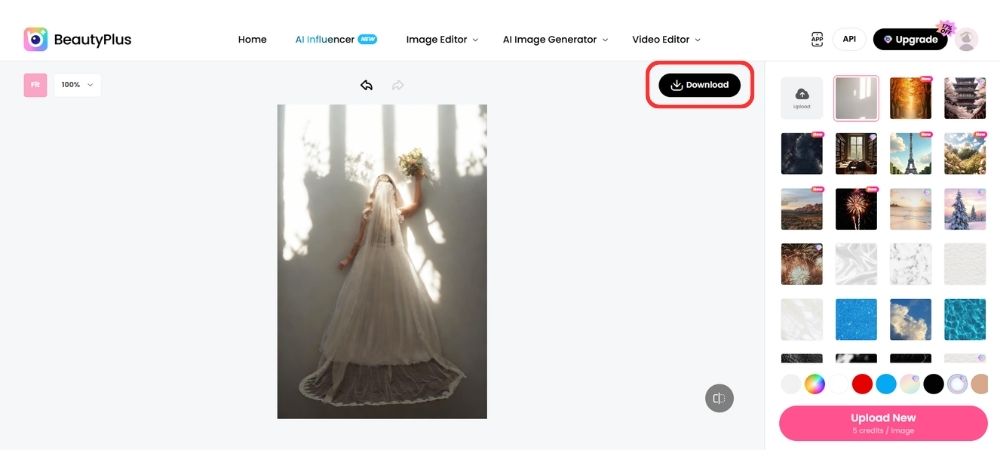
6. Once you’re satisfied with the result, click “Download” near the top-right corner of the image.
Remove BG shutting down basically means that its standalone website will no longer be available to use. Existing enterprise API contracts will continue, while Remove BG’s technology will remain accessible through Canva and Leonardo.ai. But with the shutdown approaching, many users have already started looking for a good, free Remove BG alternative.
Options like BeautyPlus are worth considering since it’s equally easy to use, offers high-quality results, and requires no sign-up. Plus, with features like transparent PNG exports, background replacement, and manual adjustments in its editing app, it’s a fair trade-off for users who prefer a simple background removal tool.