
AI Halloween Trend 2026: 10 Halloween Ideas to Try
Halloween 2026 is just around the corner, and AI-generated Halloween photos are already becoming a popular way to create spooky seasonal content. From nostalgic bedroom snapshots to gothic portraits and playful pet scenes, these creative ideas make it easy to try a Halloween look without preparing a full costume or complicated set. To help you catch up on this year’s AI Halloween trend, here are 10 Halloween picture ideas to inspire your next AI-generated photo.
Before You Dive In
The 2026 Halloween Photo Booth event is live now. During the event, use a Halloween frame in the web-based Photo Booth, then share the finished image publicly on Instagram or TikTok. Be sure to include #BeautyPlusHalloween2026 and #BeautyPlusPhotoBooth, and tag the official BeautyPlus account. Each day, three valid entries will be selected at random, giving participants the chance to win 12 months of BeautyPlus Max membership.
10 Ideas to Try the AI Halloween Photo Trend
1. Ceiling Fan
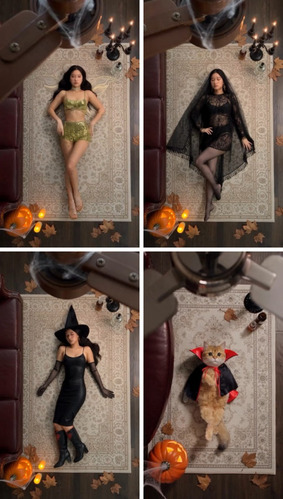
A ceiling fan can become the perfect transition tool for a Halloween transformation. As the fan blade passes through the frame, the same person can appear as a fairy, widow, witch, or vampire.
The fixed camera angle and repeated pose make the different looks feel connected. This idea works especially well for short videos because each pass of the fan can reveal a new costume or character.
On TikTok, try searching the current Effects or template library for “Halloween transition,” “fan transition,” or “costume transformation.” The exact effect name and availability may vary by region and time. The same visual can also be recreated as a still image with BeautyPlus Ceiling Fan effects.
2. X-Ray Skeleton Selfie Station
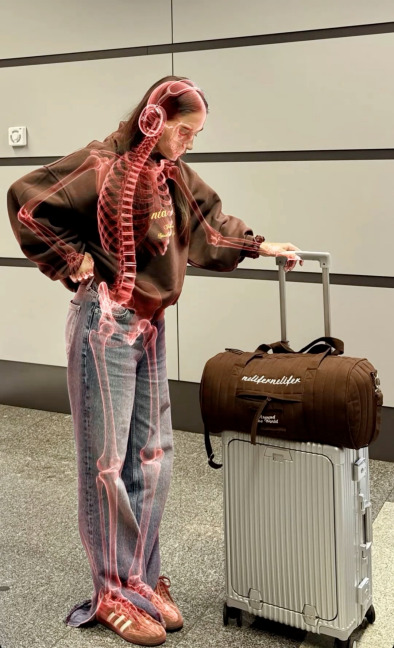
At first glance, this looks like an ordinary selfie. Then a glowing skeleton appears beneath the subject’s clothes while the face, outfit, pose, and background remain recognizable.
The contrast makes the effect easy to understand and visually striking. It also works without a full costume, making it suitable for Halloween selfies, short videos, and simple photo transformations.
TikTok has featured skull, skeleton, and horror effects, although the available effect names may change. Search the current Effects library for “X-ray skeleton,” “skeleton scan,” or “glowing skeleton.” A similar still-photo effect can also be created with BeautyPlus AI Filters.
3. Gothic Cemetery with Ravens
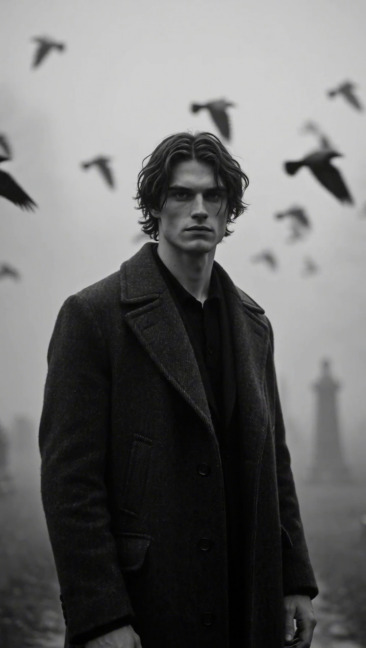
For a darker take on the Halloween trend, place the subject in a foggy cemetery surrounded by old gravestones and ravens. A long black coat, controlled shadows, and a monochrome color palette give the portrait a dark fairytale mood.
The same setting can be softened by replacing the black coat with a pale veil, turning the image into a romantic ghost portrait. This makes the idea suitable for both gothic photography and softer Halloween content.
The look is especially suitable for an Instagram-style still image, where the composition and lighting can be fully appreciated. On TikTok, users can search for gothic, ghost, or horror effects to create a similar atmosphere.
4. Trick-or-Treat Cat
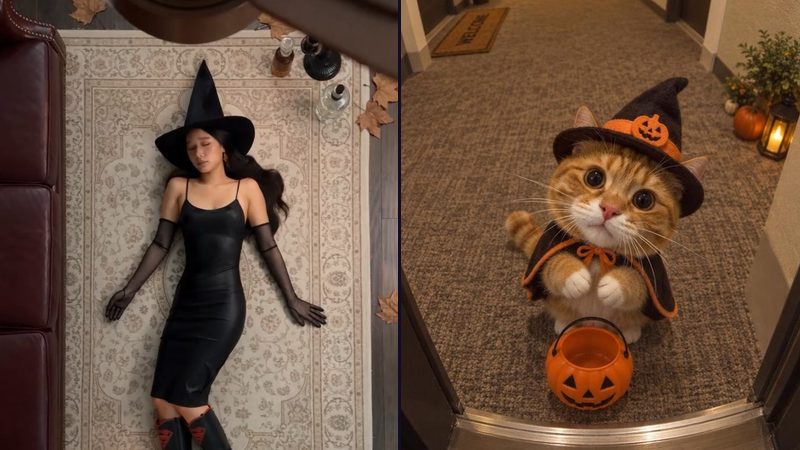
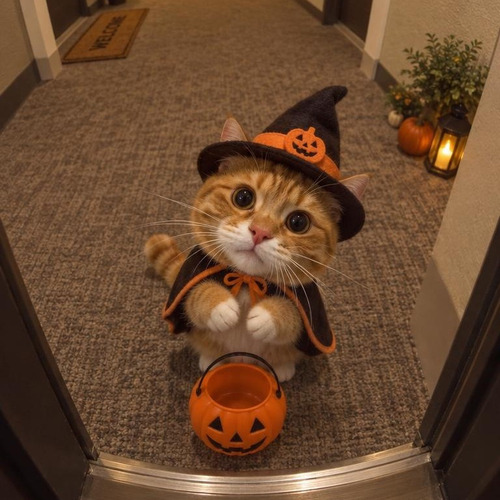
A warmly lit doorway turns a simple cat portrait into a tiny trick-or-treating story. Instead of simply showing a cat in a costume, the image presents the cat arriving at the door with a witch hat, orange-trimmed cape, pumpkin bucket, and lantern.
Realistic fur, eyes, and facial details keep the result natural and family-friendly. This type of image works well as an Instagram pet portrait or Halloween carousel.
You can recreate a similar pet portrait with BeautyPlus AI Pet Portrait and Halloween tools. TikTok also supports pet-focused effects that can add accessories such as hats and glasses to cats. Search for “Halloween cat,” “witch hat pet,” or “Halloween pet filter.” These effects can recreate the styling, while the doorway and trick-or-treating setting may need to be added separately.
Reference Image source: @vlada_ai&imagineart.creators
5. Y2K Ghostface Phone Photo
The Y2K Ghostface look feels like a still from a late-1990s horror movie: a girl on satin bedding, a corded phone in her hand, and danger waiting in the hallway.
The visual style combines a dreamy bedroom, 1990s horror posters, delicate jewelry, soft glam makeup, a black cat, popcorn, and Ghostface standing in the background. Similar AI-generated versions of this look have been shared on Lemon8 and other social platforms. The scene is mainly created with an AI image prompt rather than a single social-media filter. Here is a prompt inspired by this look:
Create a dreamy Y2K-style portrait of me lying on shiny purple satin bedding while holding a large pink 1990s-style corded phone. Place me in a thoughtful, daydreaming pose and add delicate silver jewelry, including dainty necklaces and chunky silver rings. The room should feel girly and nostalgic, with 1990s-style horror movie posters on the walls. Place a black cat on my left and a bowl of popcorn on my right. Ghostface should stand behind me in the doorway of a dimly lit hallway, staring at me with his body mostly hidden in shadow. Keep the background dark, ominous, and cinematic.
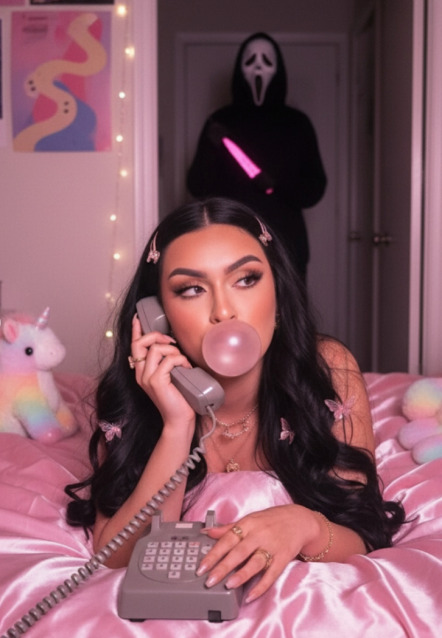
Reference Image source: @sandijarquin
6. Gothic Halloween Party Photoshoot
Halloween party photos do not need matching costumes to feel connected. A shared color palette and a few carefully chosen details can create the same effect.
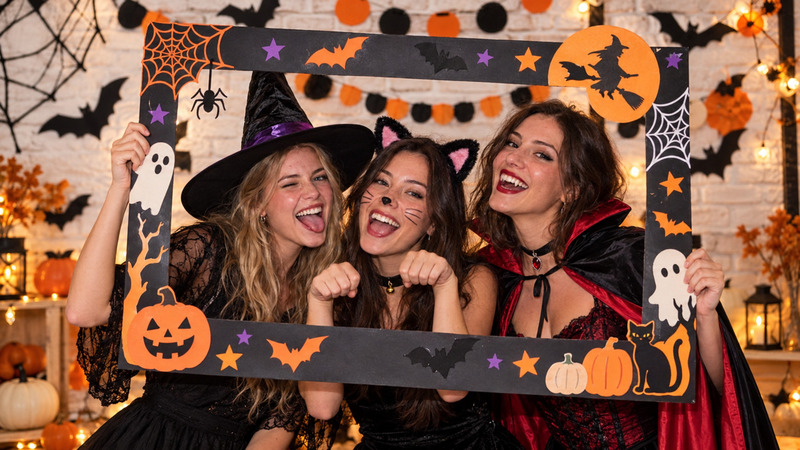
Smoky makeup, skeletal smiles, candles, pumpkins, dark flowers, and cobwebs can transform an ordinary group photo into a darker seasonal portrait. Keeping the original people and poses recognizable helps the image feel like a real party memory.
BeautyPlus AI Filters can help add a consistent Halloween mood, makeup style, and color palette to an existing group photo. The finished image can also be shared as an Instagram carousel or used as the visual base for a TikTok slideshow.
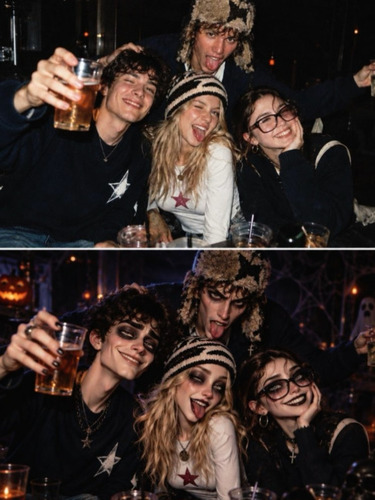
7. Pumpkin Box Portrait
The pumpkin box portrait uses a simple setup to create a strong Halloween fashion image. A wooden crate filled with glowing jack-o’-lanterns becomes the main visual element, while the warm orange light creates a dramatic but welcoming mood.
Unlike a full witch or cemetery scene, this concept does not require a large set or many props. It is suitable for anyone who wants a recognizable Halloween image with a simple composition and a strong seasonal color palette.
BeautyPlus AI backgrounds and Halloween effects can help recreate the pumpkin lighting and warm orange atmosphere from an ordinary portrait. The result can work as a single Instagram image or a seasonal profile picture.
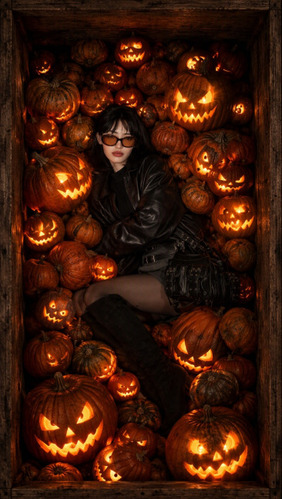
8. Silver Fairy Party Portrait
The silver fairy idea offers a softer and more fashion-focused interpretation of Halloween. Transparent wings, a mirrored silver dress, a white blazer, and a coupe glass create a polished party portrait rather than a traditional horror scene.
Bright indoor lighting and soft pink or silver tones make the image feel dreamy and editorial. This concept is a good choice for people who prefer an elegant Halloween look over dark makeup or frightening effects.
BeautyPlus fairy, wing, and seasonal AI effects can be used to create a similar look from a simple indoor portrait. On TikTok, related fairy or transformation effects may also be available, but the exact effect name can vary.
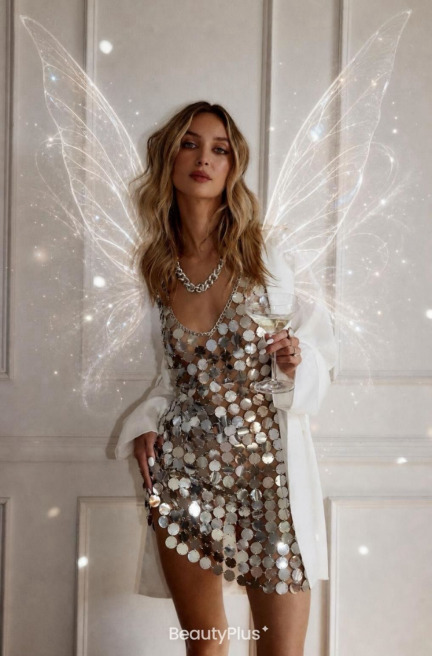
9. Candlelit Witch’s Study
A candlelit study offers a quieter alternative to the usual Halloween portrait, built around books, herbs, velvet, and warm shadows.
Leather grimoires, dried herbs, a glowing spellbook, emerald velvet, and a black cat create a cozy witchcore atmosphere. The style fits naturally into Instagram mood boards, Pinterest-inspired interiors, and dark-academia content. You can use the following prompt to create a witchcore interior scene or adapt it into a Halloween portrait:
Create a cozy candlelit witch’s study at golden twilight, with dripping pillar candles, leather grimoires, dried herbs, a glowing spellbook, and a black cat resting on emerald velvet. Use an AI-illustrated witchy cottagecore aesthetic with a dark-academia mood, warm golden lighting, and cozy gothic interior details.
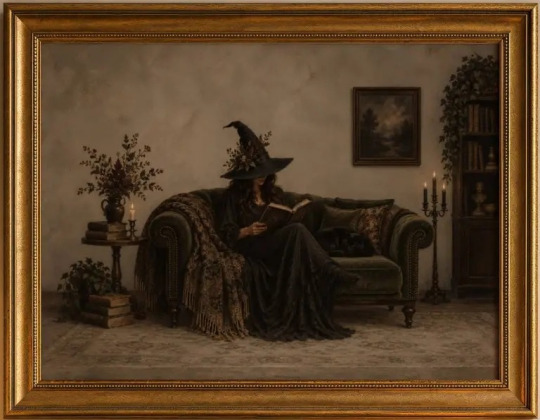
Reference Image source: @mintleafartprints · Instagram post
10. Black-and-White Skeleton Makeup
Half-face makeup creates its own visual contrast: one side remains polished and natural, while the other reveals a carefully painted skeleton.
The design combines black-and-white skull makeup with gold eyeshadow, glossy red lipstick, dramatic eye details, and realistic bone textures. It works particularly well as an Instagram beauty post, Halloween makeup tutorial, or TikTok transformation video. The following prompt is inspired by the half-face skeleton makeup style:
Create a striking headshot portrait of a beautiful young woman with a perfectly split half-and-half face design, divided down the center line. The left half has smooth warm skin, a defined dark eyebrow, elegant gold eyeshadow, long lashes, and deep crimson glossy lipstick. The right half has dramatic black-and-white skull makeup, a deep black eye socket, realistic bone texture, detailed skeletal teeth extending along the jaw and lips, and a shaded black neck. Use moody studio lighting, dramatic side shadows, a soft muted background, photorealistic detail, cinematic styling, and a 35mm photographic look.
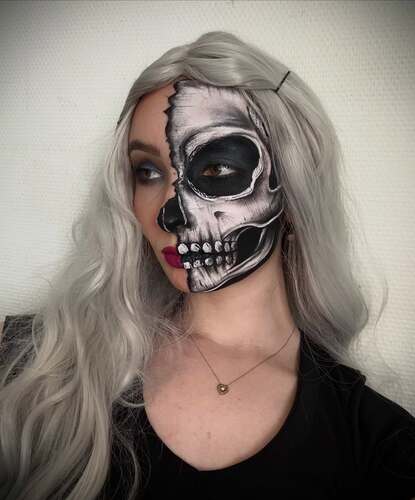
Reference Image source: @_emma_styles67
How to Recreate the AI Halloween Trend with BeautyPlus
Before you begin, prepare the costume, makeup, props, lighting, and background. Although TikTok filters and prompts can create highly stylized results, they are not the only way to join the AI Halloween trend. Alternatively, BeautyPlus lets you turn an ordinary photo into a Halloween-style image with ready-made AI filters, without building the entire scene from scratch.
In addition, BeautyPlus combines photo editing, AI effects, and Halloween filters in one app, making it easy to create polished images for social media. Here is how to make your own AI Halloween photo:
 Download on App Store
 Get It on Google Play
- Start by opening the BeautyPlus App and tap “Start Editing.”
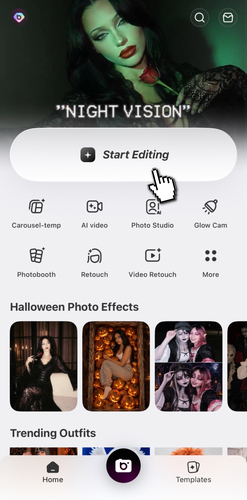
2. Next, choose a clear photo from your gallery and tap “Edit.” A well-lit photo with the face clearly visible usually gives the most natural result.
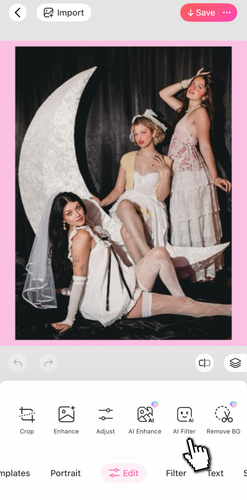
3. After that, scroll through the editing tools to find “AI Filters,” then select the “Halloween” category.
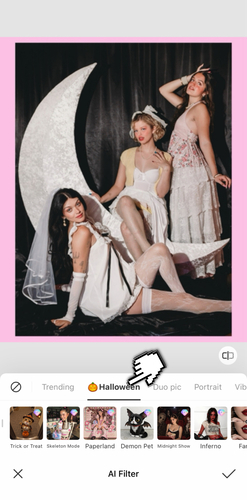
4. From there, try different Halloween styles to match your aesthetic, such as Ghost Face, Wicked Me, Hexfig, Bloodstain, Stranger Sky, or Whimsy Noir.
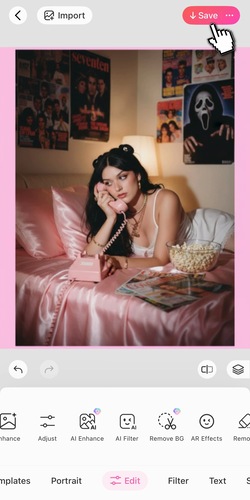
5. Once you are happy with the result, tap “Save” in the top-right corner to download the image and share it on your socials.