
How to Create the Viral 1980s AI Photo Trend
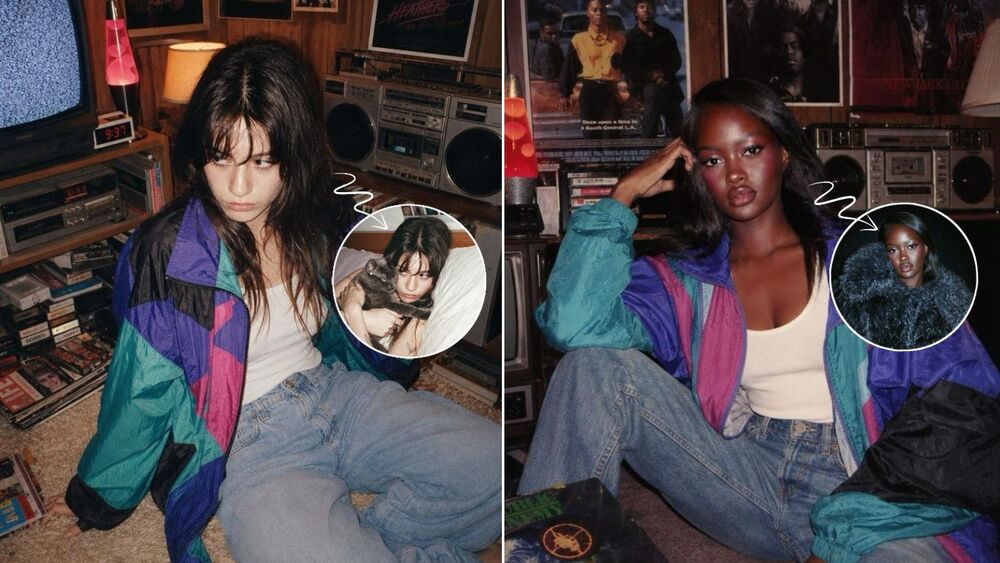
The 1980s AI photo trend is turning modern selfies into nostalgic portraits that look like they came straight from another decade. Instead of simply adding a vintage filter, AI can restyle your hair, outfit, background, lighting, and overall photo texture.
Want to try it yourself? Below are two easy ways to create the look: use BeautyPlus for a quick result, or customize your own version with a ChatGPT prompt.
 Download on App Store
 Get It on Google Play
What Is the 1980s AI Photo Trend?
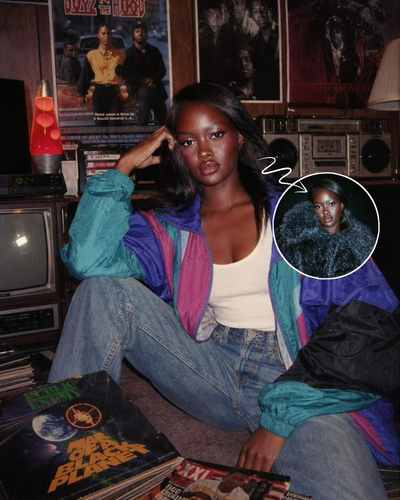
The trend transforms a current portrait into a believable 1980s-style photo while keeping you recognizable. Think retro hairstyles, vintage outfits, direct flash, faded colors, film grain, and old-school rooms or studio backdrops.
The appeal is simple: you still look like yourself, but the photo feels like it came from an old family album. It is essentially a “what would I look like in the 80s?” makeover with a nostalgic twist.
How to Make an 80s AI Photo with BeautyPlus
If you want to try the trend without writing prompts, BeautyPlus offers a much quicker route.
Step 1: Open Photo Studio
Open BeautyPlus and enter Photo Studio from the home screen.
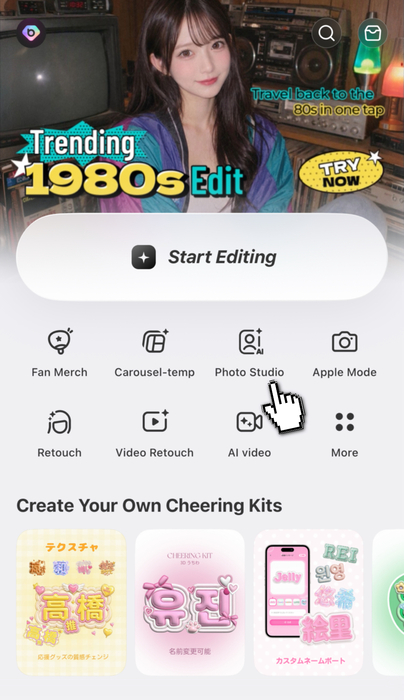
Step 2: Find the 80s Look
Go to the Hot category and find the 80s-style effect shown in the app. Since the look is already prepared, you do not need to describe the hairstyle, outfit, room, or camera style yourself.
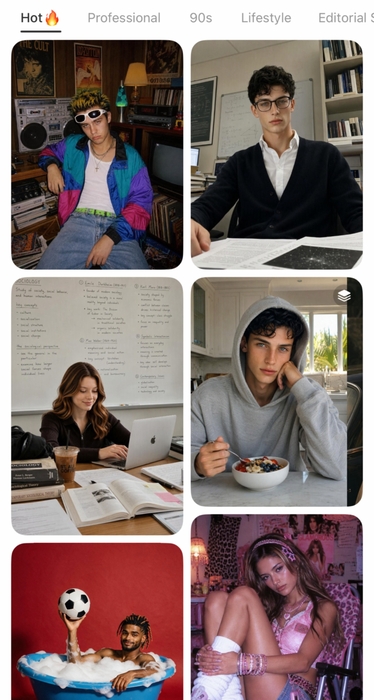
Step 3: Upload and Generate
Upload a clear portrait and generate your retro photo. A photo with a visible face, good lighting, and minimal obstruction usually works best.
Want Another Retro Vibe? Try the 90s Style
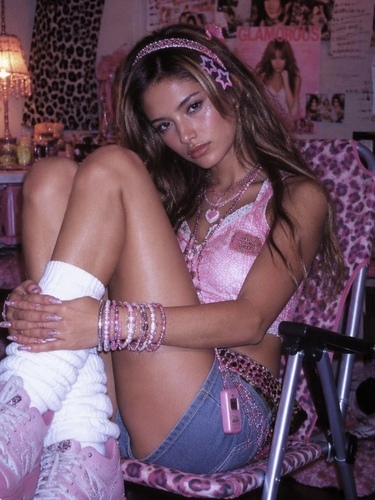
BeautyPlus also has a 90s-inspired effect in Photo Studio. This look feels sweeter and more playful, with details such as pink leopard print, a pink mini skirt, slouch socks, loafers, and a girly retro mood.
The 80s look leans more nostalgic and analog, while the 90s version feels bolder, cuter, and more fashion-focused.
How to Make an 80s AI Photo with ChatGPT
If you want more control over the setting, outfit, or overall mood, ChatGPT gives you more freedom.
Upload a clear portrait, paste a detailed prompt, and generate the image. If one detail does not look right, refine that part instead of rewriting everything.
Recommended 80s AI Photo Prompt
Using my uploaded photo, preserve my recognizable facial features, identity, skin tone, and proportions. Reimagine me as an authentic late-1980s candid portrait, sitting casually on the floor in a cozy retro room with wood-paneled walls, a vintage CRT television, stereo equipment, a lava lamp, scattered magazines or records, and nostalgic 1980s posters in the background. Give me a soft shaggy 1980s hairstyle, natural makeup, and an effortlessly cool expression. Dress me in a colorful retro windbreaker jacket over a simple white top, with high-waisted light-wash jeans and white socks. Use warm indoor lighting with subtle direct flash, slightly faded film colors, gentle 35mm grain, and a believable analog snapshot feel. Make the image look like a genuine photo taken in the late 1980s, not a modern photo with a vintage filter. Remove modern objects, smartphones, logos, and contemporary styling.
This works better than simply asking for an “80s look” because it also defines the hairstyle, outfit, room, lighting, film texture, and modern details to remove.
Why Prompts May Need a Few Tries
Different source photos can produce different results even with the same prompt. Social media creators also use many variations, so recreating a specific look may take a little testing.
If you would rather skip the trial and error, the ready-made BeautyPlus effect is the more direct option.
3 Popular 80s AI Photo Looks for Inspiration
1. Retro Photo Booth
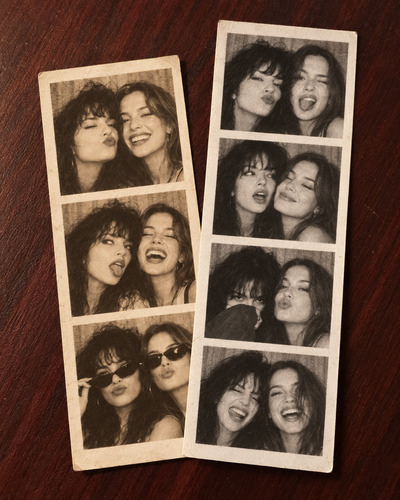
This style recreates old printed photo booth strips with playful expressions, faded colors, grainy black and white, and a casual analog feel.
Prompt
Using my uploaded photo, preserve my recognizable facial features, identity, skin tone, and proportions. Create a nostalgic retro photo booth composition placed on a dark wooden tabletop. Show two vertical photo strips slightly overlapping in a casual stacked arrangement. One strip should contain 3 frames with a warm yellowed vintage tint, and the other strip should contain 4 frames in a low-saturation grainy black-and-white style. In each frame, keep me as the subject with playful, natural photo booth expressions and small pose changes. Make the strips look like real printed photo booth snapshots with soft analog texture, subtle blur, visible film grain, and slightly faded tones. Keep the overall mood authentic, candid, and nostalgic. Do not use modern graphic poster frames or branded photo booth borders. Remove modern logos, smartphones, and contemporary styling.
2. Classic 80s Studio Portrait
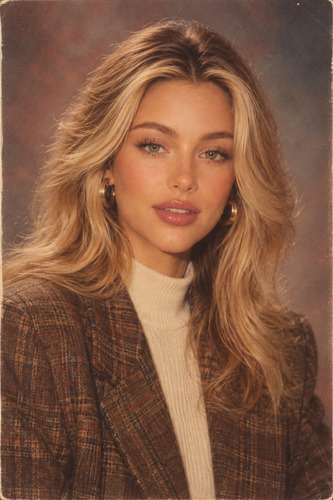
This is the classic retro portrait look: voluminous hair, vintage clothing, soft direct flash, warm faded film colors, and a nostalgic studio background.
Prompt
Using my uploaded photo, preserve my recognizable facial features, identity, skin tone, and proportions. Reimagine me as an authentic 1980s portrait with voluminous era-appropriate hair, retro clothing, soft direct flash, warm faded film colors, subtle 35mm grain, and a nostalgic studio background. Make the image look like a genuine photo taken in the 1980s rather than a modern photo with a vintage filter. Remove modern objects, logos, smartphones, and contemporary styling.
3. 80s Yearbook Portrait
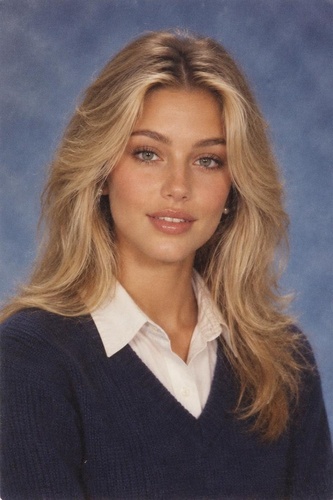
For a more understated look, try a vintage yearbook portrait with a simple backdrop, neat pose, feathered hairstyle, and slightly faded print texture.
Prompt
Using my uploaded photo, preserve my recognizable facial features, identity, skin tone, and proportions. Reimagine me as an authentic mid-1980s yearbook portrait with softly feathered hair, natural makeup, simple era-appropriate clothing, a plain blue-gray studio backdrop, soft frontal flash, slightly faded print colors, and subtle film grain. Keep the pose neat and understated. Make it look like a genuine 1980s school portrait rather than a modern image with a retro filter. Remove modern accessories, logos, and contemporary styling.
FAQ
It is an AI photo trend that transforms a modern portrait into a retro 1980s-style image using era-inspired hair, clothing, lighting, backgrounds, and film texture.
Yes. In BeautyPlus, open Photo Studio, go to the Hot category, and choose the 80s-style effect to generate the look directly.
A clear portrait with good lighting and a visible face usually works best. Avoid heavy shadows or objects covering large parts of your face.
Include decade-specific details such as retro hair, vintage outfits, direct flash, faded film colors, film grain, and period-appropriate backgrounds. Removing modern objects also helps.
The 80s look feels more nostalgic, casual, and analog, while the 90s version feels more playful, girly, and fashion-focused.