
10 Remove BG Alternatives for Image Background Removal 2026
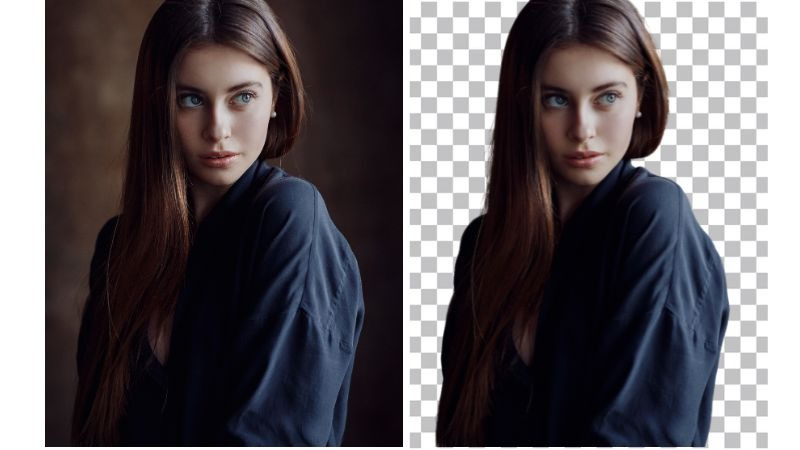
On December 1, 2026, one of the most iconic background removal tools of its time, remove.bg, will no longer be accessible as a standalone website and will instead move to Canva. This means many of us will either have to look for a Remove BG alternative or switch to Canva, where background removal may require a paid subscription. And simply put, not all of us want to be told where to enter our card details just to remove a background from an image. It’s exhausting. So, this list of Remove BG alternatives focuses on tools that come closest to what made Remove BG so popular in the first place: accurate background removal, clean results, ease of use, and affordable pricing plans.
Overview of Remove BG Alternatives
This summary of the background removal tools will give you the gist of why these names make the cut to potentially become the best Remove BG alternative for you.
| App Name | Features | Price |
|---|---|---|
| BeautyPlus | Accurate object isolation, natural reflections, 4× upscaling, background library | Free; paid from $10/month |
| Adobe Firefly | Prompt-based editing, multiple AI models, background generation, relighting | Free; paid from $9.99/month |
| Canva | Fast background removal, manual refinement, image enhancement, integrated editor | Free plan; paid pricing starts at $18/month |
| Photoroom | AI backgrounds, custom shadows, lighting adjustments, product photo templates | Free; paid from $4.99/month |
| Pixelcut | AI background suggestions, prompt-based editing, original-resolution exports, API | Free; Pro from $8/month |
| Picsart | Background removal, manual refinement, integrated editing, direct sharing | Free; Pro from $10.50/month |
| Clipdrop | Background removal, bulk editing, flyaway detection, relighting | Free; paid from $15/month |
| Slazzer | AI upscaling, relighting, sky replacement, AI shadows, API | Free; credits from $0.16 each |
| Jukebox Print | Free batch removal, 4× upscaling, high-resolution exports, watermark-free downloads | Free |
| Fotor | AI background replacement, image enhancement, background library, built-in editor | Free; Pro from $8.99/month |
BeautyPlus

BeautyPlus has impressively maintained consistency in the quality of the output. And removing backgrounds from images was a breath of fresh air for that exact reason: the quality held up. Regardless of what the object is, that’s always my test: is it still workable after the background’s been removed?
But that alone isn’t the reason I’d call it a legitimate Remove BG alternative, though. On complex backgrounds, edges were beautifully preserved with no sign the background was ever there. As for frizzy or curly hair, a few minimal flyaways got cut off during removal, but overall the image isolation never felt or looked off.
Reflective images, like glass, were equally refreshing. Not only was the object isolated in good quality, but applying certain backgrounds from the library also shifted the object’s color grading. For reflective objects like glass bottles or vases, the reflections came through with adequate shadows and light passing through naturally.
You get one free download with no watermark, but if you plan to use the tool consistently, the paid plan is worth checking out, starting at just $10/month.
 Download on App Store
 Get It on Google Play
Adobe Firefly

Known for its prompt-based AI model, Adobe Firefly removes backgrounds, upscales images, and generates new backgrounds. It handles simpler backgrounds well, but with complex images, it sometimes appears to isolate objects other than the primary one.
The prompt tool serves as a solid all-around editor. I used it to further adjust lighting, blend backgrounds, and recover flyaway hair. Overall, I found the results to be adequate; the colors stay consistent enough that the object doesn’t feel out of place once a new background is added. It feels whole. But if you have a very specific vision, you’re likely going to have to test between various AI models and prompts.
On that note, I’d consider it a plus that you get AI models featuring ChatGPT, FLUX, and Google’s Nano Banana. However, choosing between models and writing precise prompts can overwhelm the average user. Paid plans start at $9.99/month.
Canva

Canva’s background remover is one of the fastest on the list, but “haste makes waste” is what came to mind when testing it on a couple of pictures. For the simplest cases, the ones most editors got right, Canva’s object remover left a little unnecessary addition behind. This felt annoying, especially coming from Canva. The good news is, you can always open it in the Canva editor to remove it and do more editing, like enhancing the image or recovering flyaways. The edge isolation is still one of the most competitive out there, and upon download, the quality is impressively workable.
Photoroom

Photoroom’s background remover was the closest to Remove BG in terms of simplicity and the speed it got the image ready. There were slight edge deformities that could have been better, but it did an excellent job with images that didn’t have complex backgrounds. You can also choose a background from its very elaborate library, pick how you want the shadow to look, position the object, adjust lighting, change its angle, add an outline, and more.
This means that regardless of what your object is, you can get it to blend with your background so it appears natural. Except it’s entirely manual and takes a fair amount of time, not just figuring out how to use it, but actually getting comfortable with the tool. If you don’t want to go that deep, you can simply choose a template and call it a day. Starting at just $4.99/month, it’s a decent Remove BG free alternative.
Pixel cut

Pixelcut is yet another tool that puts the spotlight on its prompt-based feature. But its capability is quite impressive. The upload speed is decent, and it has an analyze feature that recognizes the object and suggests backgrounds. Upon clicking any suggested background, it automatically fills in the prompt and applies it. My chief complaint is that despite applying and coinciding with the object, the adaptability isn’t fully there.
The shadows and reflections appear natural, but the object itself remains unchanged in terms of lighting, warmth, and color. For example, light doesn’t naturally pass through glass objects or create the reflections you’d expect from the surrounding environment. This is a major drawback, especially for users looking to create realistic product photography on a budget. If you want to access its pro model, it starts at $8/mo.
Picsart

If you’re looking for a Remove BG alternative free of cost, Picsart’s background remover is an adequate option to consider. If you simply want to isolate the object with good edge cleanup, direct shareability with other platforms, all while maintaining quality, and free of cost, Picsart won’t disappoint.
But if you need to further edit the photo, adding depth, giving it shadow and reflection, or blending the image with backgrounds, you’ll need to look beyond the free tool. To access its myriad of wallpapers and more advanced features, Picsart offers a separate Background Remover Pro, starting at $10.5/mo, apart from its free tool. This can feel excessive for many, but if you’re a frequent Picsart user, it might be worth it.
Clipdrop

A background removal tool can’t get simpler than Clipdrop. There’s no distraction, just a simple upload, or more if you like, considering it has a bulk edit option of up to 10 images. Right off the bat, the flyaway detection was really good, and so was the edge clearance. The quality drop, though, was one of the most underwhelming parts of the experience, enough to negate its pros by a margin. The image didn’t entirely feel usable afterwards. So if you’re only looking for background removal, not professional use, it’s a good enough option, plus you can adjust the relight feature to give it a brighter appearance.
Slazzer

Slazzer has a very unique approach to its tool. It removes backgrounds from objects effortlessly, efficiently, and quickly; the object isolation and edge clearance are flawless. But what I loved was the custom approach it gives after you go through the sign-up. You can upload your image up to 25MB, and the initial output is very low quality, not entirely workable, but you can use the AI upscale or AI enhance feature to level it up.
I also tested out AI Shadow, Relighting, Sky Replacement, and DeOldify to see how they held up. While they all worked well, my only disappointment was with the interface. Imagine having to adjust sliders, eyeballing your way through without knowing how much is too much or too little, simply because you don’t get a live preview and are essentially shooting in the dark. Having control over the intensity is nice, but it would be even better if you could see how each adjustment affects the image.
Jukebox Print

Jukebox is both fast and effective. The time it takes to produce an isolated image, regardless of how complex the background is, is very impressive. That said, if you do wish to download, the quality drop is very disappointing. The download options let you upscale up to 4x for free, and the best part is no watermark tags along. This is what makes Jukebox easily a better free Remove BG alternative. Within the tool, you’ll find a lack of background options, and reflective images don’t do well either.
Fotor

Fotor’s background remover may not come off as the most effective one right away. But once you open it in the editor, the entire game changes. Yes, initially the quality isn’t exactly the best, but you can ultimately enhance it while downloading. The background feature is one of the best, almost on par with BeautyPlus, where it doesn’t just blend naturally with the object so it appears to be naturally kept there, but the quality is also improved drastically, pulling the whole image together. As perfect as the image looks to be, though, downloading it requires you to sign up to a pro account starting at $8.99/mo.
Conclusion
Many users remove backgrounds from images only to add another one back in. Product photography, or just generating professional-looking images in general, is a prime reason why they do so. To narrow down your search a bit, my personal opinion is this: after background removal, it’s always better if the quality is enhanced, but at the very least, it should maintain the original quality. And once an external background is applied, the object shouldn’t feel out of place, it should sit naturally within it.
For this, BeautyPlus make a great Remove BG alternative along with Fotor, though it locks this particular feature behind its paid tool. Adobe Firefly did well too, but considering you need to experiment with a lot of prompts to get there, it may not serve everyone.