11 Free Face Editing Apps That You Need to Try in 2026
Key Takeaways
- Among the top 11 face editing apps, BeautyPlus proves to have decent face editing features, from skin smoothing and makeup tools to face reshaping and AI transformations.
- Peachy, Airbrush, FaceApp, and Facetune offer AI-backed face retouch options, great for both professional and casual use.
- YouCam Perfect and Canva have higher subscription costs as they provide a wider range of editing features.
- Making certain changes while taking photos, such as changing lighting and background, can spare heavy editing from editing apps later on.
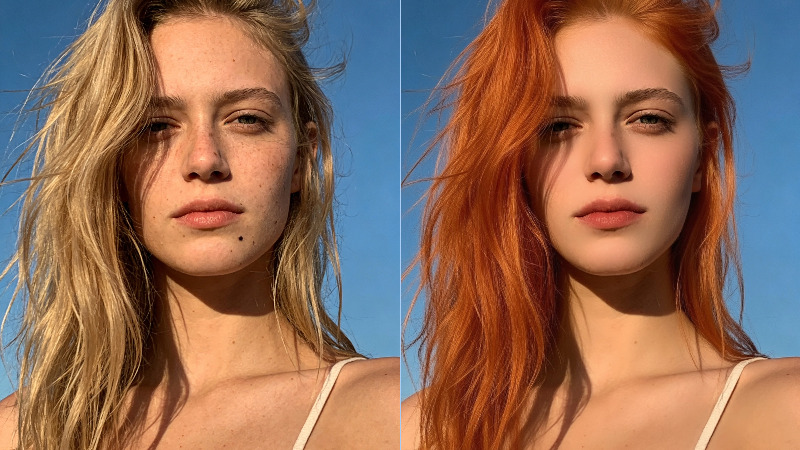
If you’ve found yourself scrolling through influencer Instagram profiles or rifling through magazines full of celebrity glam shots, you might wonder, “How does someone look so good naturally?” Yes, part of it is in the makeup, the skincare, and the lighting, but even with all of the prep work, the photos are heavily edited.
Not everyone has the resources to get the same results or have their photos professionally touched up, but thankfully, with today’s technology, they no longer need to. Free face editing apps have made the inaccessible within arms reach, so here are 11 face editing apps that can help you take your photos to the next level without costing a dime.
 Download on App Store
 Get It on Google Play
How We Tested
Face editing apps, or editing apps in general, have been around for quite some time, and many of them gained popularity for a few specific reasons. Those reasons still hold today:
- Ease and intuitiveness of the app: We consider how easy the app is to use and how intuitive it feels. In other words, how easily an average user can navigate through the tool and find what they are looking for.
- Versatility in features: A good tool should not rely on automated features alone. It should also provide detailed facial feature adjustments. The more versatile the features, the better. This includes face retouch options such as skin, eyes, lips, and overall face shape.
- Inclusion of presets and filters: Being able to control individual features is useful, but delivering natural results that adjust an entire area can be even more helpful.
- Availability of AI: AI is the engine of photo editors today. Many tools rely on it to produce natural looking results through recognition and automated application. So the bottom line is whether these tools include AI, and if they do, how well it works. Examples include auto retouch, smart face detection, and one tap edits.
- Price and value: Lastly, we also account for the price. We consider how much the tool costs and whether it is actually worth paying for.
Comparison Table
These are the tools we will be discussing today. To give you a quick rundown of what each app is most suitable for, this list will help you understand where each one fits and what kind of editing needs it is best suited for.
| App | Platforms | Focus On |
|---|---|---|
| BeautyPlus | iOS, Android | AI beauty edits, skin smoothing, makeup tools |
| FaceApp | iOS, Android | AI face transformations, aging, gender swap |
| Airbrush | iOS, Android | Quick portrait retouch and automatic beautification |
| Facetune | iOS, Android | Detailed facial retouch and professional portrait editing |
| Fix The Photo Body Editor&Tune | iOS, Android | Professional manual portrait retouching, skin smoothing, body correction, and background editing |
| SNOW | iOS, Android | Beauty filters, AR effects, social style selfies |
| YouCam Perfect | iOS, Android | Group selfies, beautify edits, creative effects |
| Hypic | iOS, Android | Real time face edits and camera beautification |
| Canva | iOS, Android | Design platform with basic AI photo enhancement |
| Peachy | iOS, Android | Simple AI face touch ups and quick fixes |
| PicsArt | iOS, Android | Creative photo editing with beauty tools and effects |
Top 11 Free Photo Face Editing Apps for 2026
Now that you’re clear on what to look for, here are 11 free retouch app options that meet those standards.
1. BeautyPlus

BeautyPlus is one of the free face editing apps that celebrities and social media personalities, as well as professional photographers or editors, can comfortably rely on. The app provides access to a large collection of professional-grade editing tools while keeping the editing process simple. Even when multiple adjustments are used together, the final result usually remains natural looking rather than overly processed.
It is widely known for its skin smoothing tools, real-time beautification, AI-assisted editing, one tap enhancements, and realistic makeup options that help complete the final look. This makes it a practical choice for different types of touch ups, whether someone wants a subtle clean appearance or a full glam style edit.
Another strong aspect of BeautyPlus is its detailed face editing options. Users can change hairstyles, adjust hair color, modify eye appearance, and refine small facial details. The controls extend down to minor elements such as wrinkles and fine lines, while still keeping the edits visually natural.
Key Features
- AI powered beauty enhancements
- Real time camera beautification filters
- Skin smoothing and blemish removal
- Makeup tools including lipstick and contour
- Hair style and hair color adjustments
- Eye editing including size and brightness
- Facial reshaping for nose, jawline, and cheeks
- One tap automatic face enhancement
2. FaceApp
You have probably heard of FaceApp, especially since it became widely popular before the modern wave of AI photo editors when its gender change and aging filters went viral. This free face editing app is known for its smooth performance, modern interface, and intuitive layout. Right after opening a photo, users can quickly apply edits such as impression changes, hairstyles, makeup, face shape adjustments, skin smoothing, smiles, and facial feature tweaks. It also allows changes to hair color, age, gender, glasses, beards, filters, and retouch tools, most of which rely on AI to analyze the face and apply edits that generally look natural.
Key Features
- AI powered facial transformations
- Age change and gender swap filters
- Hair dye filters and hairstyle try on
- Smile and expression adjustments
- Skin retouch and beauty filters
- Makeup and beard simulation
- Glasses and accessory effects
3. Airbrush

Another tool gaining strong popularity on the Play Store is Airbrush. The app focuses on delivering polished results with minimal effort, making it useful for quick portrait edits. It includes a retouch tool for general photo enhancement and a Magic tool that offers automatic fixes such as lip size adjustments, head shape changes, and red eye correction without requiring manual editing.
From there, users can make more specific face edits, including adjustments to face shape, jawline, chin, skin smoothing, makeup effects, and plumping tools. Some features such as Glow Up are available in the premium version, while other tools like teeth whitening and expression fixes help correct small mistakes in photos.
Key Features
- Automatic retouch and enhancement tools
- Magic tool with AI assisted fixes
- Face shape, jaw, and chin adjustments
- Skin smoothing and blemish removal
- Makeup and lip plumping tools
- Teeth whitening and smile correction
- Expression adjustment tools
4. Facetune

Facetune is a powerful manual editor known worldwide for the precise control it gives its users, letting them enhance almost anything from skin and teeth to facial structure or body shape without compromising image quality.
Key Features
- Detail enhancer for eyes and textures
- Reshape tool for face and body edits
- Teeth and eye whitening tools
- Skin smoothing and blemish removal
- Lighting and color correction tools
5. Fix The Photo Body Editor&Tune
Unlike most automatic face editors, Fix The Photo Body Editor&Tune uses professional retouchers who edit every photo manually in Photoshop. Users simply upload an image, describe the required changes, and receive a naturally edited result directly on their phone, typically within 15 minutes.
The app handles face and body retouching, skin imperfections, background adjustments, object removal, and color correction without relying on standard AI filters. The first photo is edited for free, making it easy to evaluate the quality before ordering additional edits.
Key Features
- Manual editing by professional retouchers
- Face and skin imperfection removal
- Natural body reshaping
- Background and object removal
- Color and lighting correction
- Custom retouching instructions
- First edited photo for free
6. SNOW

SNOW is a good option for users who are not confident with makeup but still want to experiment with bold looks and creative effects. The app combines beauty editing with AR filters and includes AI tools that let users create avatars, apply retouching, and experiment with playful edits quickly.
Key Features
- Real time AR beauty filters
- AI retouch for quick face edits
- Virtual makeup filter
- Avatar creation and AI effects
- Large collection of stickers and filters
7. Youcam Perfect

YouCam Perfect is the kind of tool you want on your phone when you’re on a trip with friends, since it works well for group selfies and virtual makeovers. This free face editing app allows users to apply animations, effects, and touch ups to multiple faces in the same photo, which makes it useful for group pictures.
The app includes a full editing section with several tools, along with a dedicated Beautify area where most face edits can be applied naturally. These include photo enhance, retouch, reshaping tools, and even manual hairstyle adjustments. However, compared with apps like BeautyPlus, its subscription cost is noticeably higher, which may not feel reasonable for many users.
Features
- Multi face editing for group photos
- Dedicated beautify editing section
- Photo enhance and retouch tools
- Face reshape and facial adjustments
- Hairstyle editing tools
- Animations and creative photo effects
8. Hypic
Hypic is another interesting addition to the list because it allows users to apply edits while the photo is being taken. This real time editing means you can adjust how the image looks on the spot instead of fixing everything afterward.
The app lets users apply beauty adjustments during capture and then continue refining the image later if needed. After the photo is taken, you can still make specific changes such as adjusting the nose, lips, smile lines, face shape, dark circles, and other facial details.
Key Features
- Real time face editing while taking photos
- Beauty adjustments during camera capture
- Nose, lips, and face shape editing
- Dark circle and skin correction tools
- Smile line and facial detail adjustments
9. Canva

Canva did not start as a photo editing app, but it can still be used like one for basic face edits and touch ups. After uploading an image, users can head over to the Edit Photo section where several enhancement tools become available. Canva includes automatic photo enhancement, skin smoothing, background removal, filters, and AI powered adjustments that help improve portraits quickly.
While it does not offer the same level of detailed facial controls as dedicated face editing apps, it still allows users to make useful changes such as brightness adjustments, blemish fixes, and overall face enhancement within a simple design interface.
Key Features
- AI photo enhancement tools
- Skin smoothing and blemish fixes
- Background removal and replacement
- Filters and lighting adjustments
- Face retouch and portrait enhancement
10. Peachy

Peachy includes a dedicated AI Touch section where users can apply quick fixes such as removing dark circles, reducing double chin appearance, and smoothing wrinkles or acne. These tools are helpful for quick social media edits where you want small improvements without spending much time adjusting details.
Aside from that, the app also includes basic controls for skin and hair adjustments. The feature set is not very large, but Peachy focuses on tools it can deliver reliably instead of adding too many features that the app cannot handle well.
Key Features
- AI Touch for quick face corrections
- Dark circle and wrinkle removal
- Double chin reduction tool
- Acne and skin smoothing tools
- Basic skin and hair adjustments
11. Picsart

PicsArt is more than just a face editor. It works as a full creative suite where users can edit photos, create collages, and design visual content. The app combines standard face editing tools with design features, which makes it useful for both simple touch ups and more creative edits.
Key Features
- Face editing tools for skin and makeup
- Body editor and facial adjustments
- Background blur and replacement tools
- Collage maker and creative templates
- Stickers, effects, and drawing tools
Tips to Get Better Pictures
Photo editors are there to help people who do not want to go through the expense or effort of learning complex software just to fix small things like dark circles, uneven lighting, shadows on the face, or make themselves appear more awake, attentive, or confident in a photo. And so a little attention while taking the picture can save you from heavy editing later.
- Use natural light to your advantage: Light and shadow are often the best filters you can work with. Try facing a window or a soft light source when taking photos to reduce shadows, dark circles, and harsh contrast that usually require editing afterward.
- Watch the direction of shadows: Overhead lighting or strong side lighting can create shadows under the eyes or around the nose and jawline. Change your angle or move slightly toward the light to soften those shadows and make the image look cleaner.
- Choose angles that flatter your face: Small adjustments in camera angle can change how facial features appear. Holding the camera slightly above eye level often creates a more balanced portrait and avoids heavy shadows under the chin.
- Keep the background simple: A cluttered background can distract from the subject. Choosing a cleaner environment or neutral background helps the focus remain on the face and reduces the need for editing later.
- Preserve your uniqueness: When editing, it helps to keep some natural texture and signature features. The goal of editing should be to refine a photo, not erase everything that makes the person recognizable.
- Avoid appearance pressure: Photo editing tools are meant to enhance images, not create unrealistic expectations. It helps to approach editing as a way to correct lighting or small distractions rather than chasing a perfect or artificial look.
Summary of Free Photo Editing Apps
The internet has allowed the everyday netizen to try out the best face editing apps free of charge, and that has led to a few misconceptions. Face editing apps are often villainized, but truthfully, they are not here to distort anyone’s perception of beauty; they are a fun way to experiment with your look without making drastic changes. The right editing apps are all about preserving your natural look while also making improvements that boost confidence and that is exactly what BeautyPlus is all about.