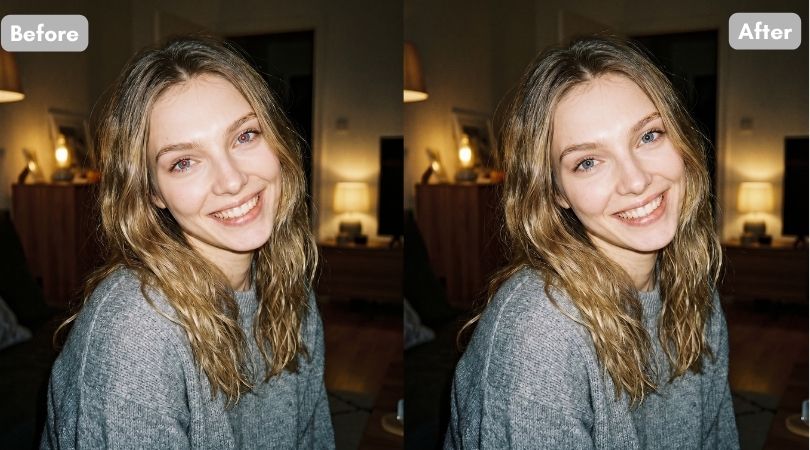
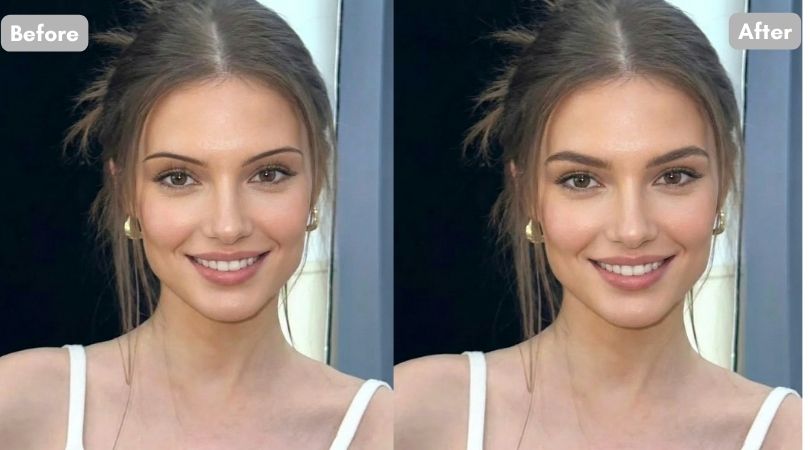
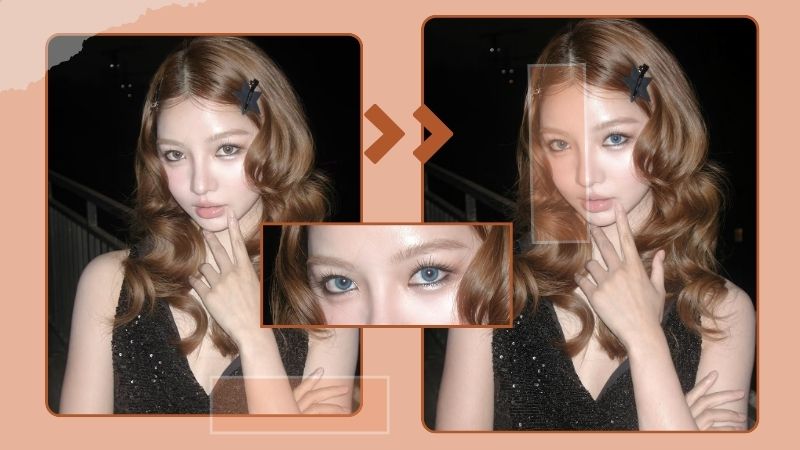
4 Best Apps to Remove Double Chin and Perfect Your Selfies
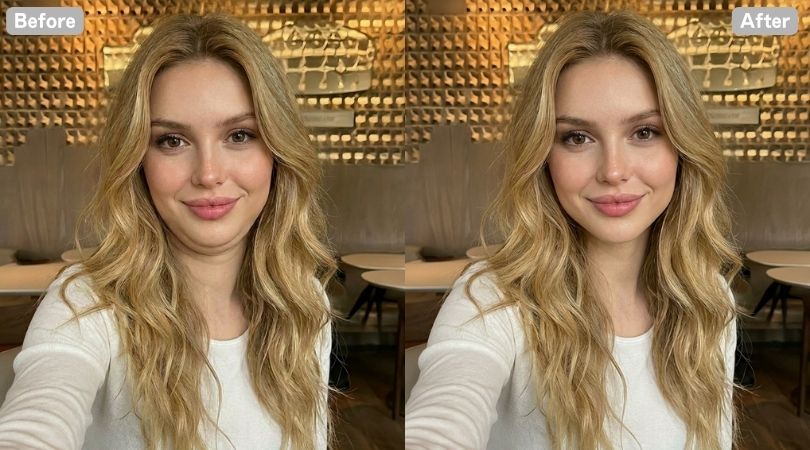
Ever snap what should have been the perfect picture, only to spot a distracting pocket of shadow under your jawline that completely throws off the shot? It’s frustratingly common. Instagram’s picture-perfect world can make anyone long to fit in. Sometimes it is okay to conform to that perfect world and become a part of it.
If you find yourself staring at that photo, wondering how you could retouch it just a little bit, so it would go on your aesthetic feed. Then here is the catch: the app to remove double chin from photo is helping people all across, and you can try them out too!
Best Apps to Remove Double Chin
These 4 best apps to remove double chin from your photo are the perfect online editors to make your picture post-worthy. They will not just restore your confidence but enhance your facial features better so you can look your best!
| App Name | Available Platforms | Pricing | Feature Highlights | User Experience |
|---|---|---|---|---|
| BeautyPlus | Android, iOS | Free / Advanced features require Premium Plan ($0.049 per credit) | Auto-fixes lighting with ‘Double Chin’ and ‘Jawline’ dual sliders for quick sharpness | Perfect for beginners and bloggers; requires zero skills to instantly fix harsh lighting shadows with a simple slide |
| Evoto | Android, iOS | Free to download & experiment / Photo exports require credits ($0.08 per credit on Basic Plan) | High-end AI that reshapes chins, neck, posture, and symmetry without losing skin texture | Designed for mobile photographers and creators |
Retouch Me | Android, iOS | Subscription-based (Perfect Body & Face Editor at $9.99 per month) | Professional designers available to assist you with the face tuning | Users who prefer custom, human-vetted refinement |
| YouCam Perfect | Android, iOS | Free signup / Advanced features require Plus Plan ($0.26 per credit) | A smart ‘OFF/ON’ toggle that instantly erases jaw shadows, combined with automated full-face makeup | Highly intuitive for busy users |
1. BeautyPlus
BeautyPlus has an unbelievably smooth interface when it comes to any type of editing. Sharpening your jawline definition while removing the double chin from the photo is one of them. BeautyPlus uses the power of Artificial Intelligence to analyze the lighting and contours of your image, making it one of the best photo apps to fix unflattering camera angles for free. So if you are struggling with tricky overhead shadows or a slightly awkward head pose, and are looking for ways to quickly restore a well-defined jawline, BeautyPlus should be one of your top choices.
Apart from adjusting angles and lighting, BeautyPlus is extremely convenient when it comes to upgrading your overall photos. If you are a blogger who is looking to enhance the quality of their posts, BeautyPlus would be a thoughtful assistant to work with. You could be a beginner and still make great work of this application because it is that easy to use.
The application is mostly free, but you will have to get the premium if you are looking for comprehensive use. However, as a free alternative to premium, BeautyPlus offers all the paid features for free if you watch three ads, for an entire day. This will take less than a minute.
Available Platforms: Android and iOS
Price: Free / $0.049 per credit(Premium Plan)
With BeautyPlus available in both Android and iOS, it is accessible for all mobile users who are considering downloading and using a double chin remover app with ease.
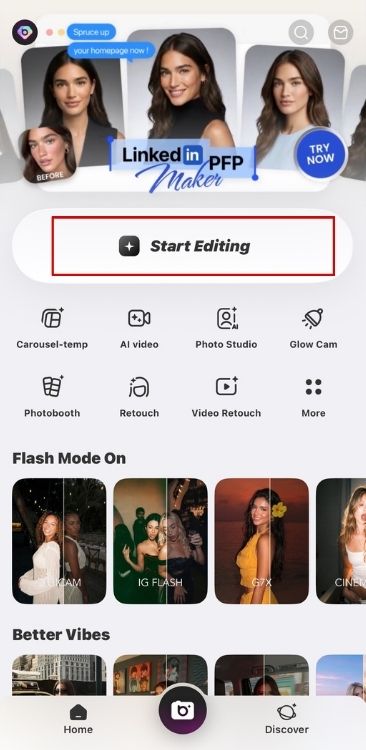
1. Open the BeautyPlus App and tap ‘Start Editing’.
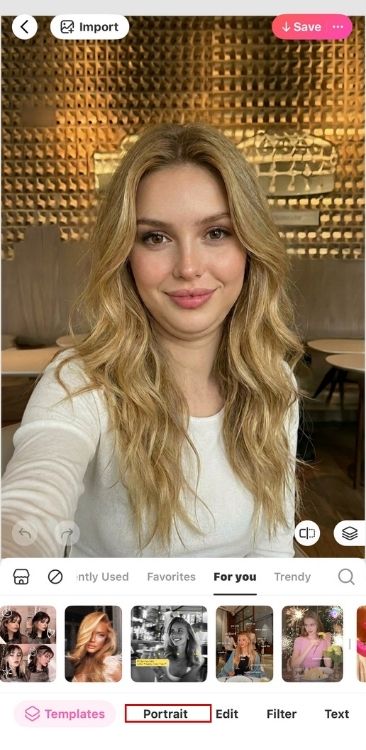
2. After uploading your image, you will see the ‘Portrait’ feature and tap it.
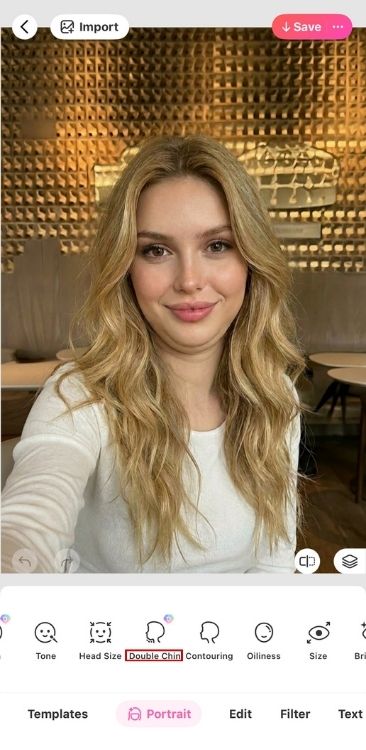
3. Next, choose the ‘Double Chin’ tool.
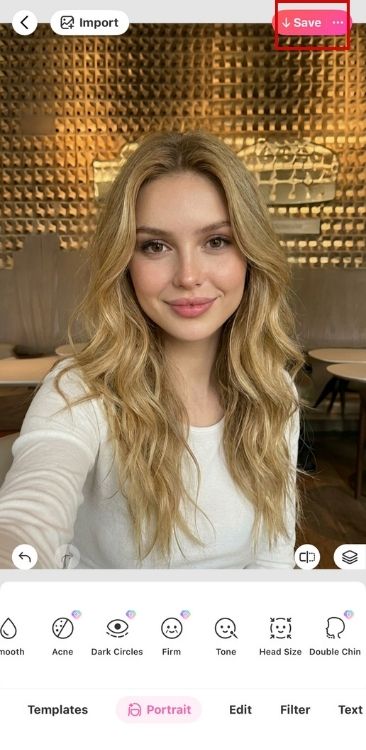
4. You will now enter the ‘Double Chin’ editing page, and you’ll see two features: ‘Double Chin’ and ‘Jawline’. Use the ‘Double Chin’ first to reduce fullness, then adjust the ‘Jawline’ slider to sharpen definition.

5. Once you are done editing the chin and jawline, tap the ‘Tick’ icon in the bottom right corner to exit the tool.
6. If you are satisfied with the results and want to save the image, tap ‘Save’ in the top right corner.
2. Evoto
Evoto feels more like a professional photo editing app than a typical beauty filter tool. The interface includes a wide range of AI-powered editing features, making it a good option for photographers, creators, and users who want more control over portrait retouching.
You can download the app and try many of its tools for free, but exporting edited photos requires credits. When it comes to double chin removal, Evoto does a solid job of reducing shadows and adjusting jawline contours caused by lighting or camera angles. It also offers additional controls for neck shaping, posture adjustments, and facial symmetry.
That said, Evoto may not be the easiest choice for beginners. Because it includes so many editing options, the learning curve is steeper than what you would find in a simple one-tap beauty app. If you’re willing to spend some time exploring the controls, you’ll have access to more detailed adjustments than most casual photo editors provide.
Available Platforms: Android and iOS
Price: $0.08 per credit (Basic Plan)
Evoto makes it really easy to fix tricky portrait angles and head tilts. So for everyone wondering how to quickly define their jawline without destroying skin texture, Evoto’s smart AI slider is probably the best way to have it done.
1. Open Evoto and upload a photo from your gallery.
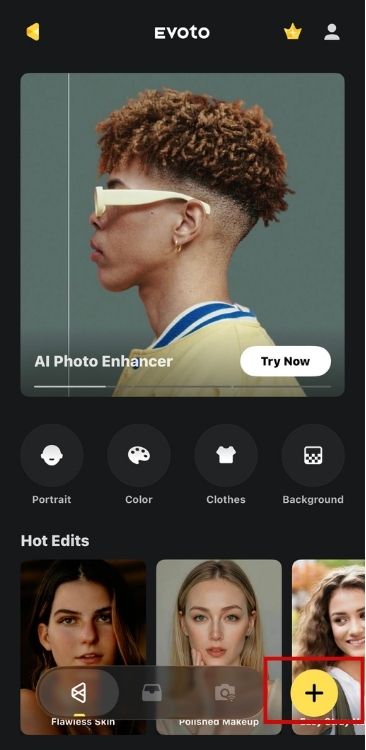
2. Tap ‘Portrait’ in the bottom menu to access portrait editing tools.
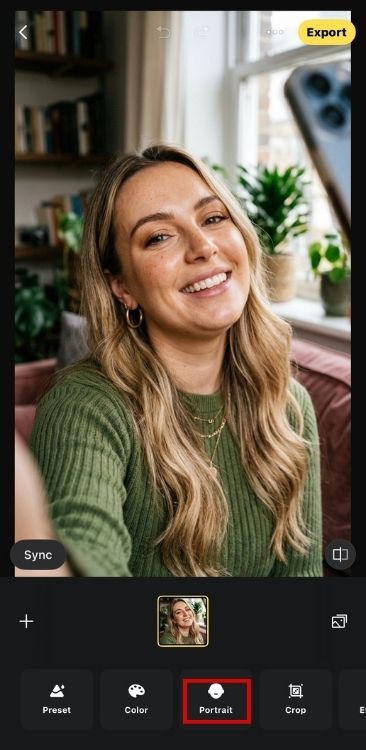
3. Find ‘Double Chin’ feature.
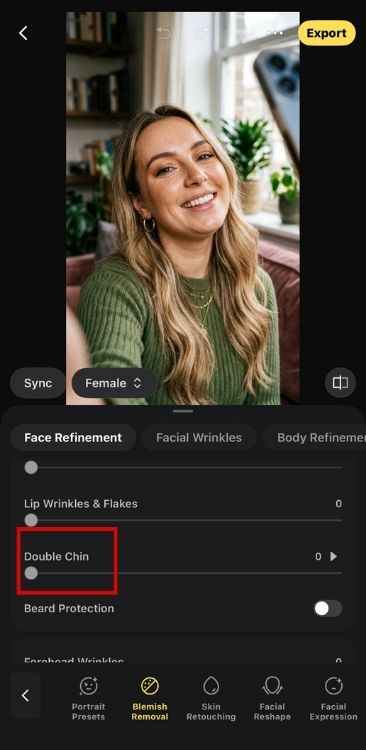
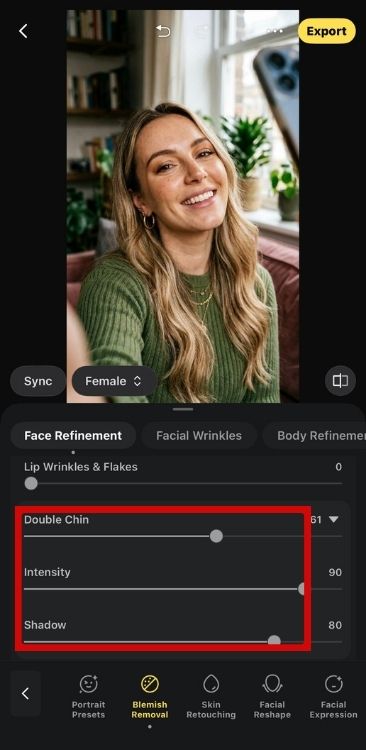
4. Adjust the slider until you are satisfied. You can also tweak the ‘Intensity’ and ‘Shadow’ settings if needed.
5. When you’re happy with the edit, tap ‘Export’ and confirm the export.
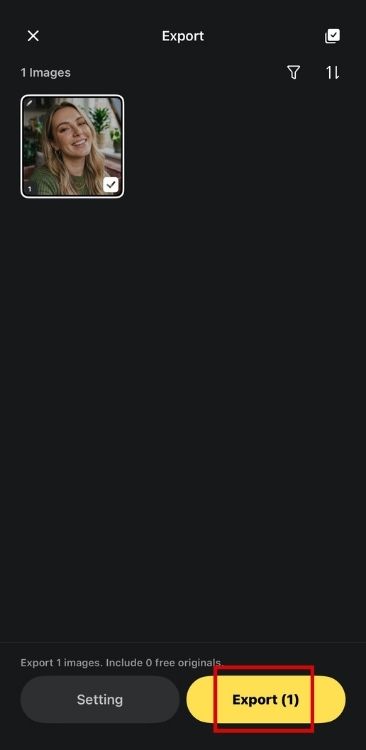
6. Keep the screen steady while the app completes the render, then you will get the photo.

3. Retouch Me
Retouch Me provides you with a smooth platform to work with. However, to use this double chin remover app even just one time, you will need to pay for the premium. You can edit your facial features and your body. You can retouch your overall picture too. Unlike what we normally see with face photo editor apps that uses AI to analyze and alter the image, Retouch Me is a services app which has professional designers available to assist you with the face tuning.
Available Platforms: Android and iOS
Price: Perfect Body & Face Editor – $9.99 per month
Here’s how you can remove a double chin using the RetouchMe app, make sure to download the app from the App Store to follow the steps accurately.
1. Once you open the Retouch Me, you will notice your partial gallery on the home screen of the app, scroll and select the image that you wish to edit.
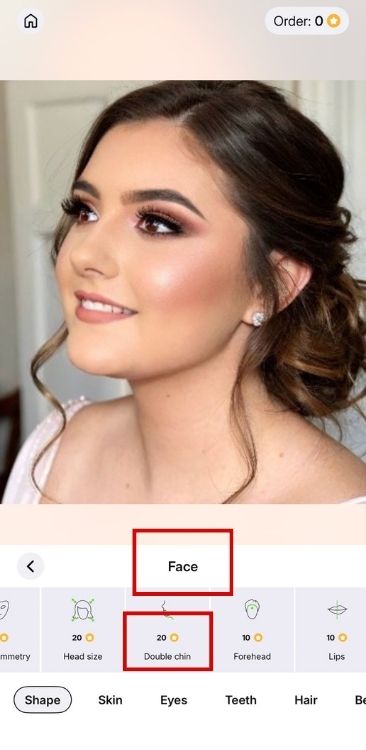
2. At the bottom, you swipe through various tools and features available within the app along with their prices. To jump directly to the Double Chin service, tap on ‘Face’ > ‘Remove Double Chin’.
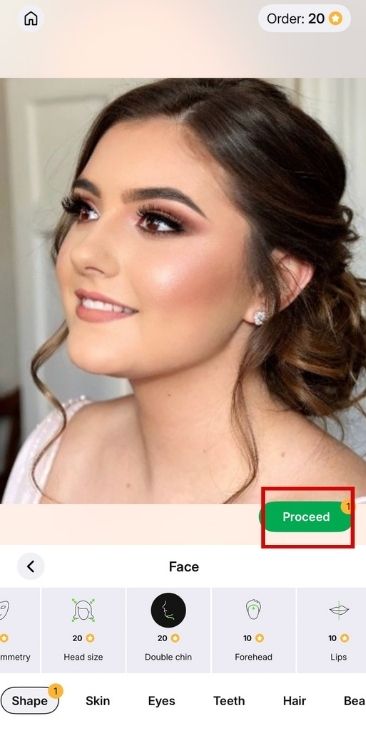
3. With the service now selected, tap on the ‘Proceed’ button to begin the process of connecting with a professional who will edit and remove the double chin.
4. YouCam Perfect
YouCam Perfect is an everyday pocket studio that requires very little investment to elevate your photos in various ways. Using this, you can replenish your entire social feed and you will never have to worry about a camera-shy day, harsh overhead lighting, or an unflattering lens angle again.
You will notice next to no difficulties when using its app to sculpt a beautifully defined jawline; it is incredibly intuitive and does not require any prior editing expertise. The app’s interface is sleek and aesthetic; you will feel that nothing is missing. It is truly the ideal creative assistant for anyone with a constantly busy lifestyle.
Sure, you will get rid of that camera-induced double chin effect (virtually), but you can also balance your portrait features by using tools such as enhancing your natural face contours. This includes smart features that will make your skin look lit-from-within, give you a flawlessly blended glam makeup look, soften tricky shadows around the eyes, and so much more. And these enhancements are so beautifully subtle, it will take someone a good, long look at the picture before they can even put a finger on it.
Available Platforms: Android and iOS
Price: Sign up for free / $0.26 per credit (Plus Plan)
You can begin editing your images by using the YouCam Perfect app after you have downloaded the app on your mobile device, and the steps are simple and easy to follow.
1. Open the YouCam Perfect app and upload the image you want to edit. Tap ‘Edit’ of the menu.
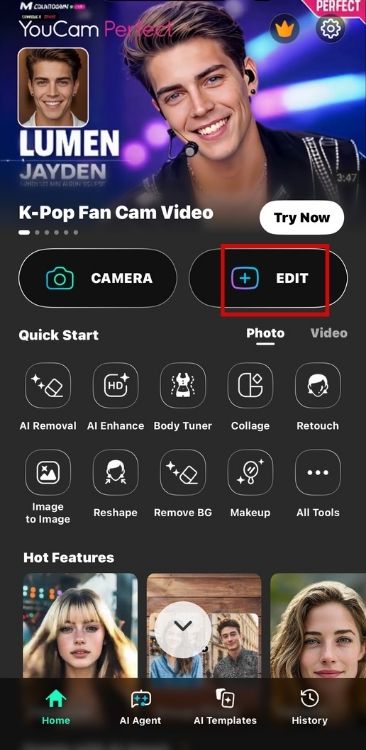
2. Once your photo opens, navigate to the bottom tool menu under the ‘Beautify’ tab.
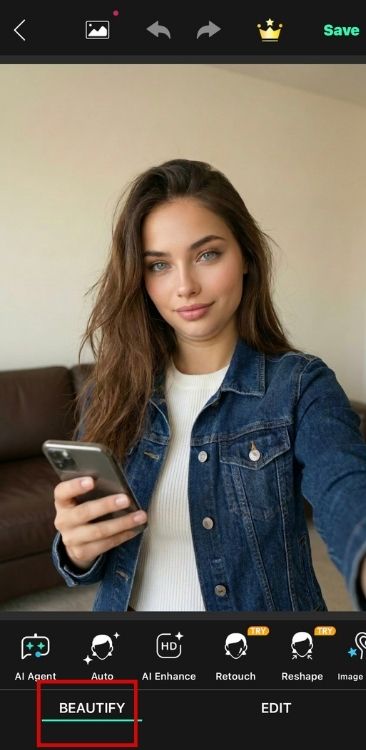
3. Then tap on ‘Retouch’.
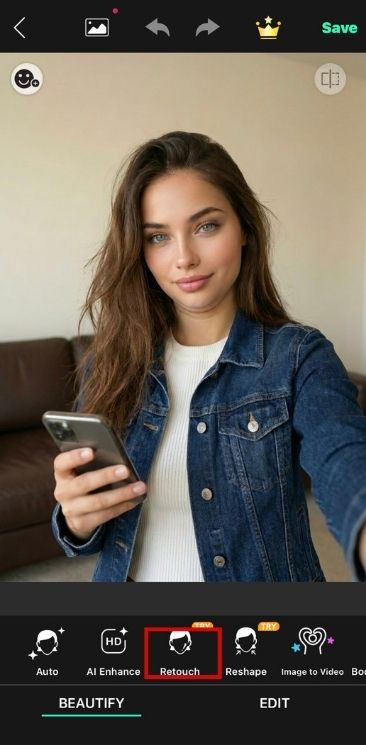
4. Scroll through the retouching features at the bottom and select the ‘Double Chin’ tool.
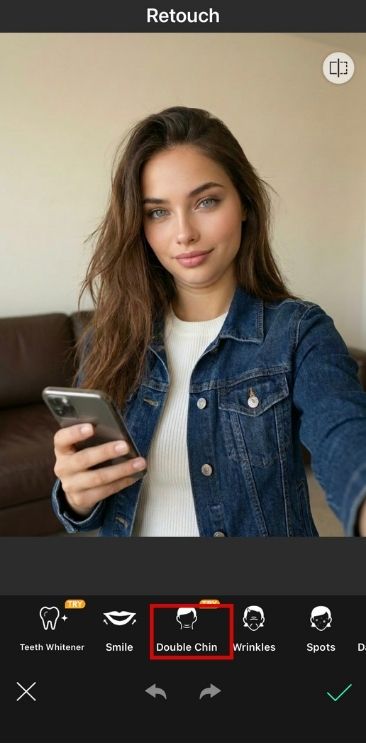
5. Toggle the switch at the bottom from ‘OFF’ to ‘ON’ to let the AI automatically refine the double chin and lift harsh camera-angle shadows.
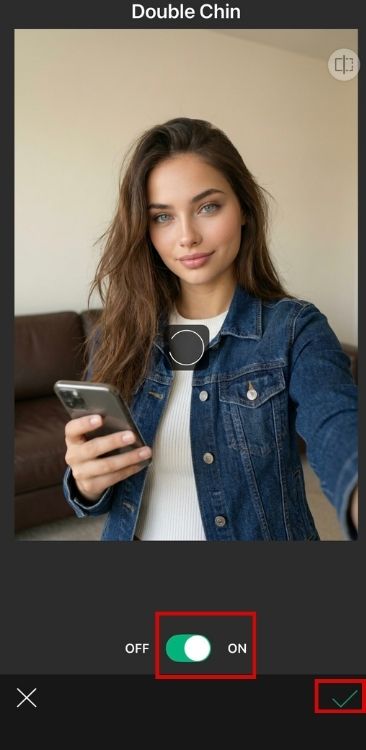
6. If you are happy with the results, tap ‘Tick’ in the top right corner to export your refined portrait to your device.
How to Get Rid of a Double Chin
If you are looking for a more practical way to get rid of your double chin, you should know that fat in one particular place can never be targeted. You can never lose face fat just by doing face exercises. To achieve that, you need to lose the overall fat percentage of your body, which takes patience, time and effort.
To break it down for you, you will need to go in a calorie deficit, indulge in cardio, – could be power walking, running, dancing, and strength training exercises. You can add upper body exercises and facial massages too, to get quicker results. But remember this, to keep this in the long run, you will need to make sure that you are gentle on yourself, that way you will be able to turn this into a lifestyle.
Photography Tips to Get Rid of Double Chin
Sometimes, it’s all in perception too. Perhaps your face is leaning back, which can make a double chin appear in the first place. Here are a few photography tips that will at least make sure you don’t have to go through crash diets and can instantly reduce that double chin in pictures.
- Lift your camera angle: When you hold your camera lower, your double chin will likely fold as you’re forced to look down, and the star of the photo will be none other than your double chin. Lifting the camera above your eye level can fix this and even create the impression of a longer neck.
- Direct light to your face: When harsh light pours directly from above your head, it can create strong shadows, especially around the neck area. Direct light to your face instead to limit these shadows.
- Push your face forward: Don’t press your head down against your neck, you’ll likely create a double chin unintentionally. Practice in the mirror by sticking your neck out slightly to see if it makes a difference.
FAQs
If you normally don’t have a double chin, chances are it appears in the photo attributing to either how you pose or your camera angle. Try lifting the camera above your eye level or improving your posture to see if it makes any difference.
Yes, you can use online tools with AI to remove double chin or use third party apps with dedicated double chin removing feature.
You can use reshaping, smoothening, or replacing AI tools through photo editing apps to remove double chin. Some apps like BeautyPlus even have dedicated double chin removing features.
Yes. Free apps like BeautyPlus, Retouch Me, and Facetune offer slimming or retouching tools to reduce a double chin.
Bottomline
On one hand, we have the desire to present ourselves as the world asks us to; to be the most polished of ourselves, even when we feel far from it. On the other hand, we have this sense of betrayal of our true selves. Balancing these two aspects of ourselves can be challenging.
However, when the urge to fit in the world wins – which, keep in mind, is not wrong – you have these convenient, easy tools at your fingertips that will help you work your way through this confusing world. You can make your virtual life seem perfect and imperfect if you have the right tricks. So, use them wisely.